VCF 9.1 - VPCs Connectivity Policies
In this blog post, I’ll discuss the new VPC connectivity Policies and how they can be used to enhance security.
1439 Words // ReadTime 6 Minutes, 32 Seconds
2026-05-05 16:00 +0200
Introduction
A new VCF release is just around the corner, and just like the transition from VCF 5.X to 9.0, this one brings massive changes as well. Not only is the entire fleet being turned upside down, but there have also been a ton of changes to my favorite topic: VPCs in NSX. One of the many new features is VPC Connectivity Policies. Today, in this blog post, I’ll explain what you can do with them and how they work. So let’s dive into VPC’s rabbit hole.
What are Connectivity Policies?
Just a quick note before we begin: if you’re not sure how VPCs work, you can read about them in my articles on VPCs in VCF9. I won’t be going over the basics here. Here’s a good place to start on this topic.
First, I should probably outline the test setup. In total, I will have 4 VPCs, numbered 01–04 for simplicity. In general the connectivity policies do only apply to networks from type public subnet, private transit gateway or assigned external IPs of a specific VPC. Based on this limitation I have configured a public and private transit gateway subnet for each of my VPCs. In each subnet, I have deployed an Alpine VM that has obtained an IP address via DHCP. Without a connectivity policy, the public VMs are accessible as usual both inside and outside my lab, and the private transit gateway VMs are accessible only between VPCs on the same transit gateway—business as usual.
There are currently 3 different policy types, which is why I need 4 VPCs. As an additional test, I have set up a classic overlay segment on a T1 router connected to the shared T0 router to test access from non-VPC networks.
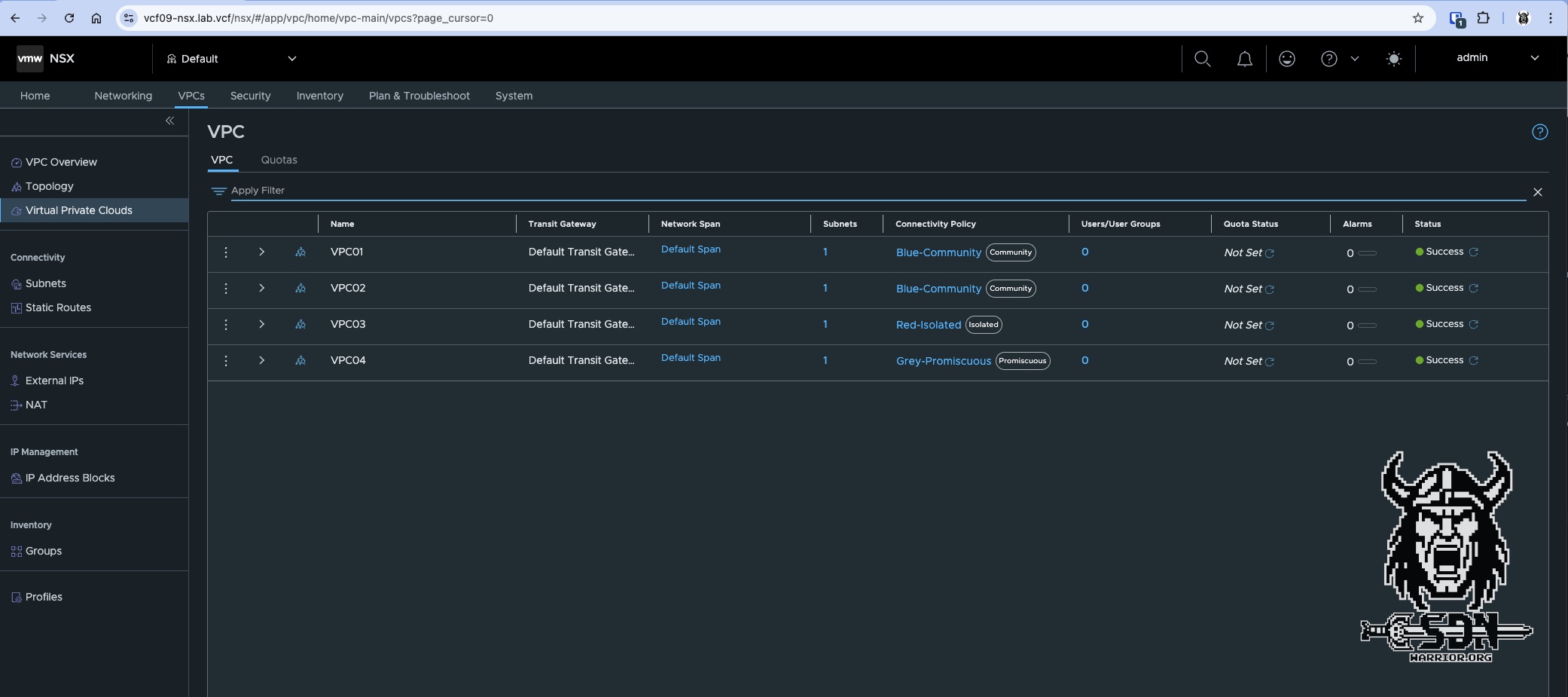
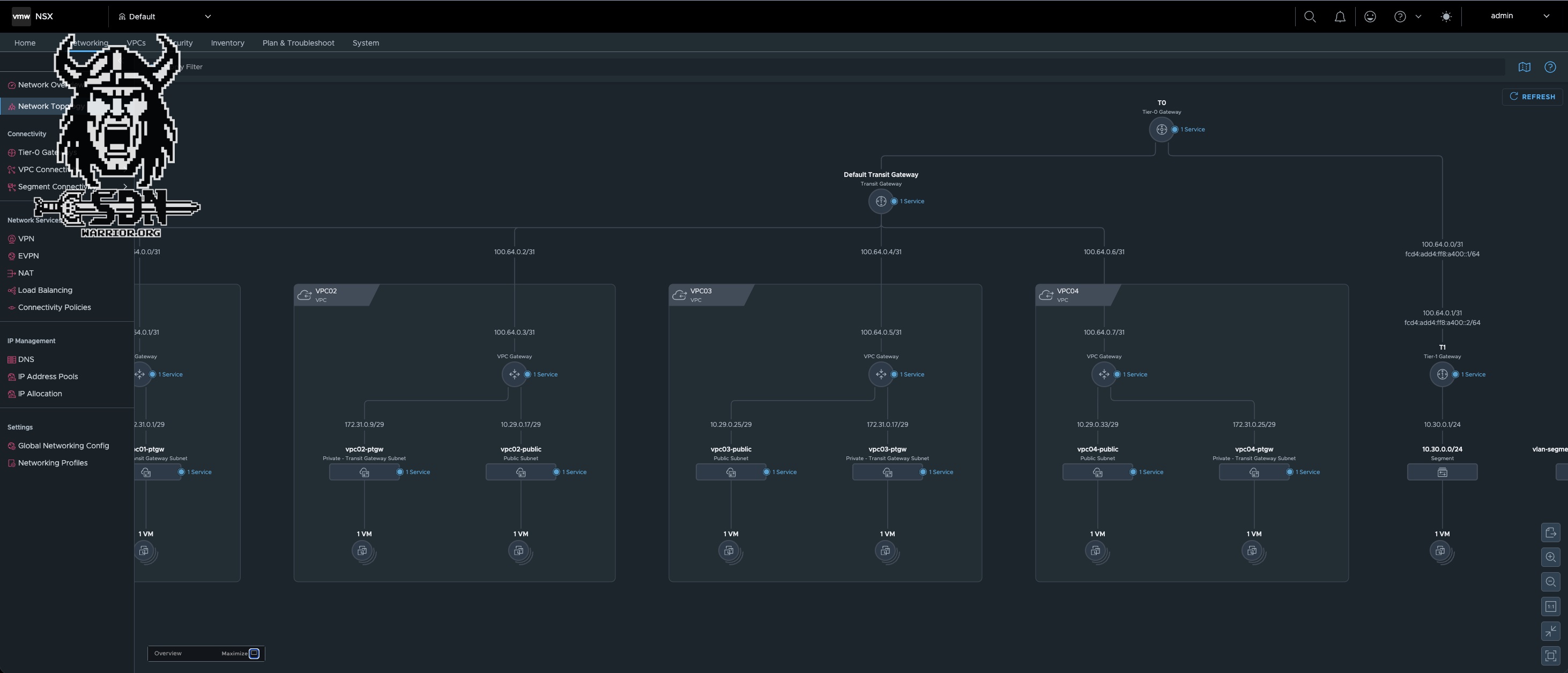
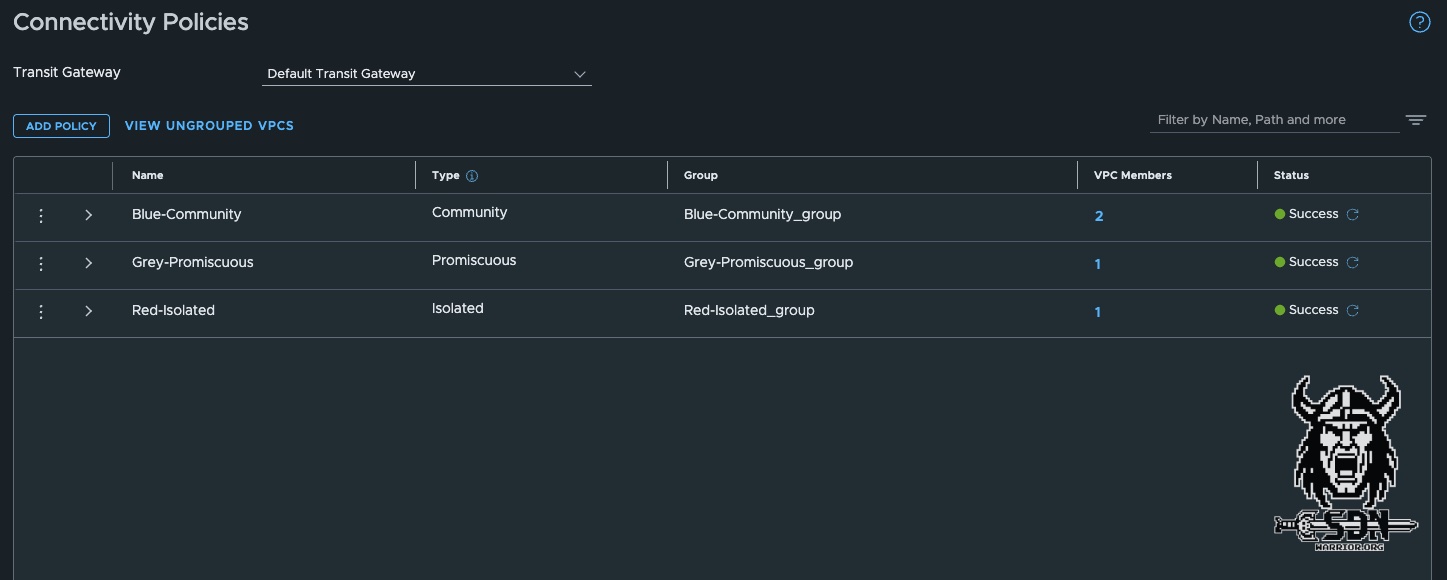
The attentive reader has probably already noticed that I have created three different connectivity policies.
- Blue-Community for VPC01 and VPC02
- Red-Isolated for VPC03
- Grey-Promiscuous for VPC04
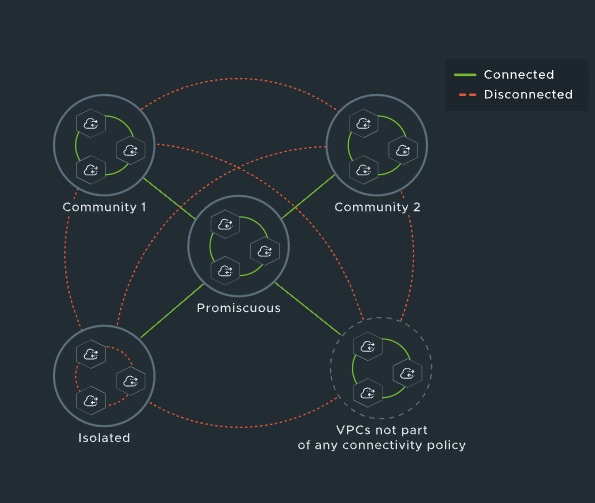
These also reflect the three types of security policies. The whole concept of the policies is somewhat reminds me a little bit of the private VLAN concept, for the network-savvy readers among you. And for anyone who’s wondering what on earth I mean, I’ll explain it again briefly. The idea behind connectivity policies is relatively simple: the goal is to control traffic between VPCs connected to the same transit gateway. This should not be confused with VPC security profiles, which may use similar terminology in some places but function completely differently and also require a vDefend license.
Community Policy
The community policy allows traffic from VPCs that belong to the same community. A community consists of at least one VPC, but typically includes several VPCs. In my setup, the community is named “Blue.” You can create any number of communities, but a VPC can only have one policy and therefore belong to only one community. In my setup, VPC01 and VPC02 belong to the same community.
Isolated Policy
The Isolated Policy does exactly what its name implies: this VPC is not accessible from any other VPC on the same transit gateway. In practice, a Community Policy with only one VPC achieves the same result. The VPC is isolated, but this can be adjusted as needed by adding additional VPCs to the community. This is not possible with the Isolated Policy. A VPC in the Isolated policy will always be isolated from other VPCs on the same transit gateway.
Promiscuous Policy
With the “Promiscuous” policy, the name says it all—anyone can get in. Effectively, nothing is blocked, but it’s not the same as if no policy were attached. This is because VPCs with a promiscuous policy ignore all other policies, which means they can also reach isolated VPCs. But that’s all just theory; let’s take a look at how it works in practice.
Practical test
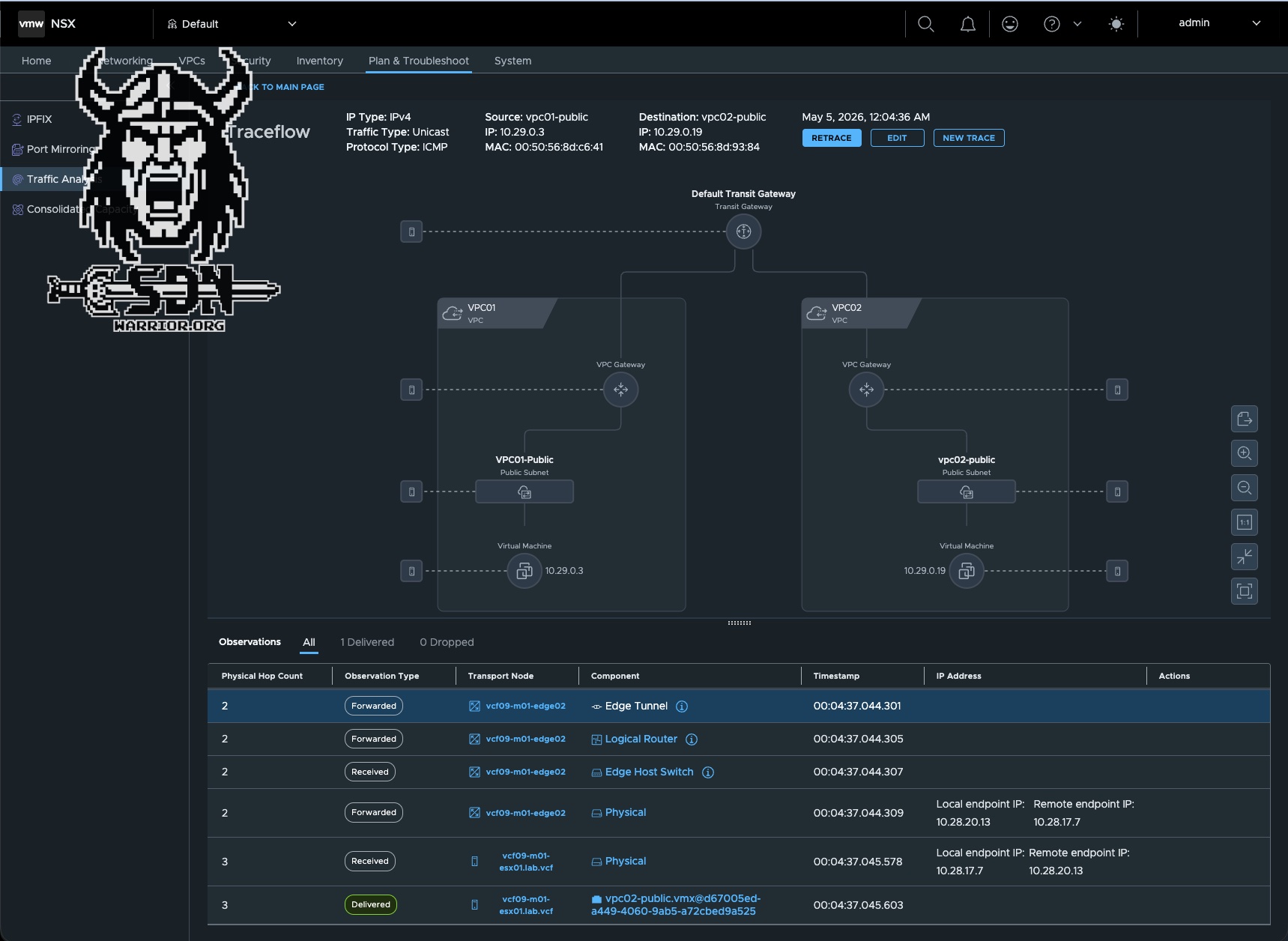
To test this out, I’ll run a variety of ICMP tests. First from my Alpine01 VM, which is connected via T1; then externally from my Mac, which is a computer located entirely outside the lab; and finally from the other VPC VMs, both via the public subnet and the private transit gateway subnet (I hate that name). I’ll also show some example screenshots from the NSX Traceflow tool, since it’s a great way to understand how things work.
The following matrix shows the expected connectivity between the test systems. SRC stands for the source system and is listed vertically in the table, while DEST refers to the destination system and is listed horizontally in the table.
A ✅ indicates that communication is expected to work.
A ❌ indicates that communication is not expected to work.
A 🟨 indicates a self-test and is not tested.
| SRC \ DEST | alpine01 | vpc01 public | vpc01 ptgw | vpc02 public | vpc02 ptgw | vpc03 public | vpc03 ptgw | vpc04 public | vpc04 ptgw |
|---|---|---|---|---|---|---|---|---|---|
| alpine01 | 🟨 | ✅ | ❌ | ✅ | ❌ | ✅ | ❌ | ✅ | ❌ |
| vpc01 public | ✅ | 🟨 | ✅ | ✅ | ✅ | ❌ | ❌ | ✅ | ✅ |
| vpc01 ptgw | ✅ | ✅ | 🟨 | ✅ | ✅ | ❌ | ❌ | ✅ | ✅ |
| vpc02 public | ✅ | ✅ | ✅ | 🟨 | ✅ | ❌ | ❌ | ✅ | ✅ |
| vpc02 ptgw | ✅ | ✅ | ✅ | ✅ | 🟨 | ❌ | ❌ | ✅ | ✅ |
| vpc03 public | ✅ | ❌ | ❌ | ❌ | ❌ | 🟨 | ✅ | ✅ | ✅ |
| vpc03 ptgw | ✅ | ❌ | ❌ | ❌ | ❌ | ✅ | 🟨 | ✅ | ✅ |
| vpc04 public | ✅ | ✅ | ✅ | ✅ | ✅ | ✅ | ✅ | 🟨 | ✅ |
| vpc04 ptgw | ✅ | ✅ | ✅ | ✅ | ✅ | ✅ | ✅ | ✅ | 🟨 |
My external Mac can access alpine01 and all public VPC networks, but not the private transit gateway networks. I did not list the Mac in the table because it acts as a control system. It behaves just like the Alpine01 test VM.
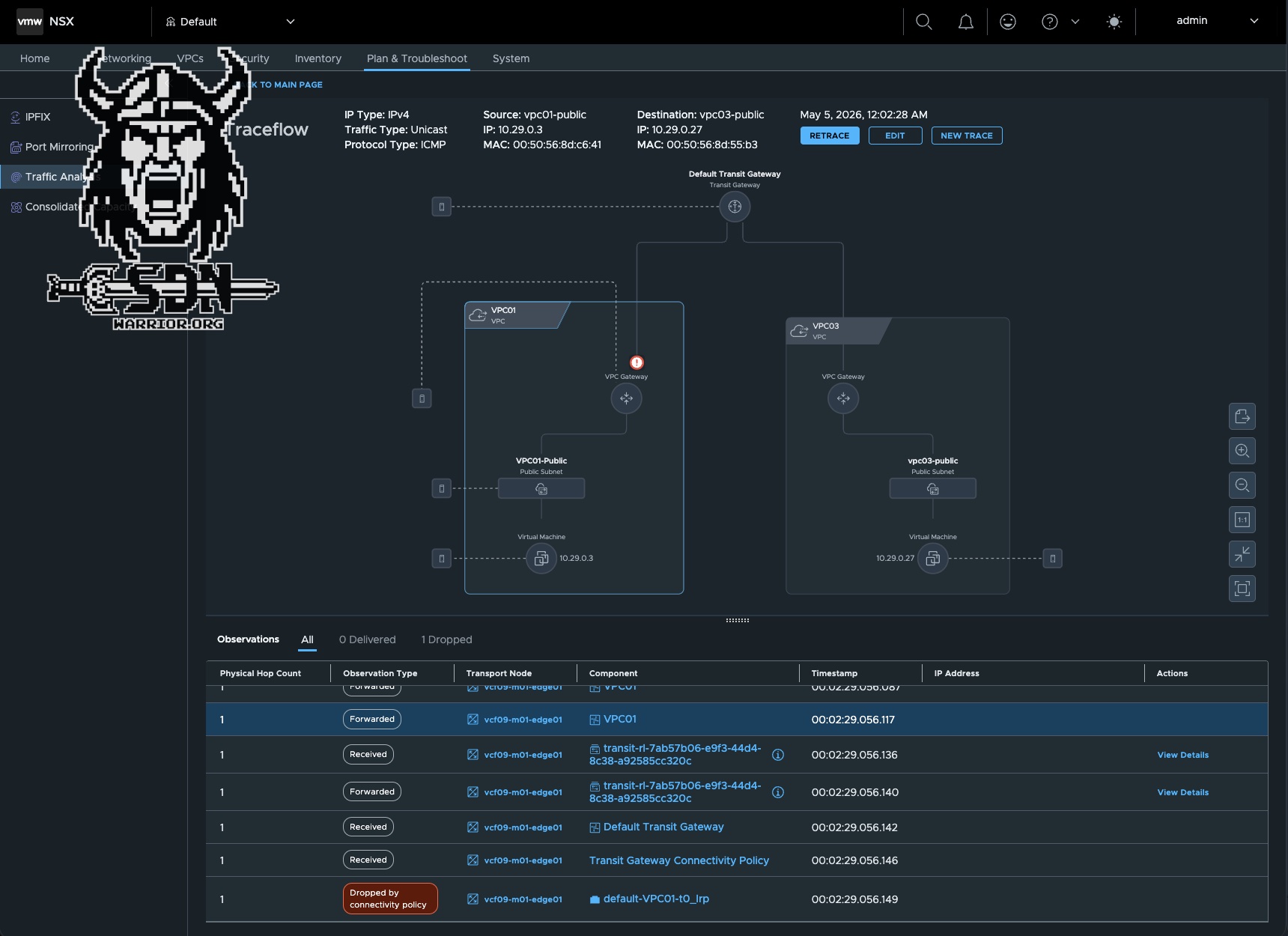
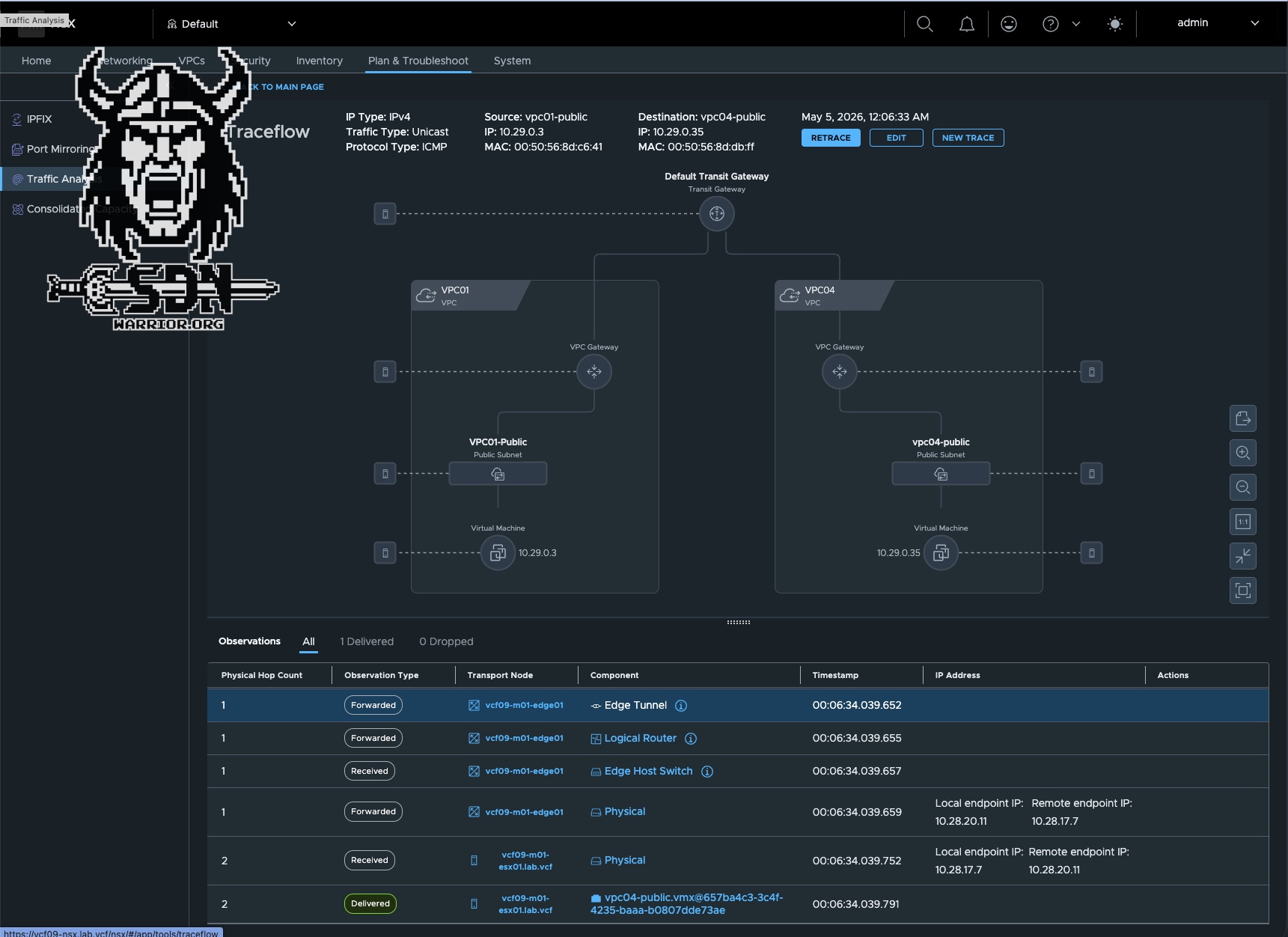
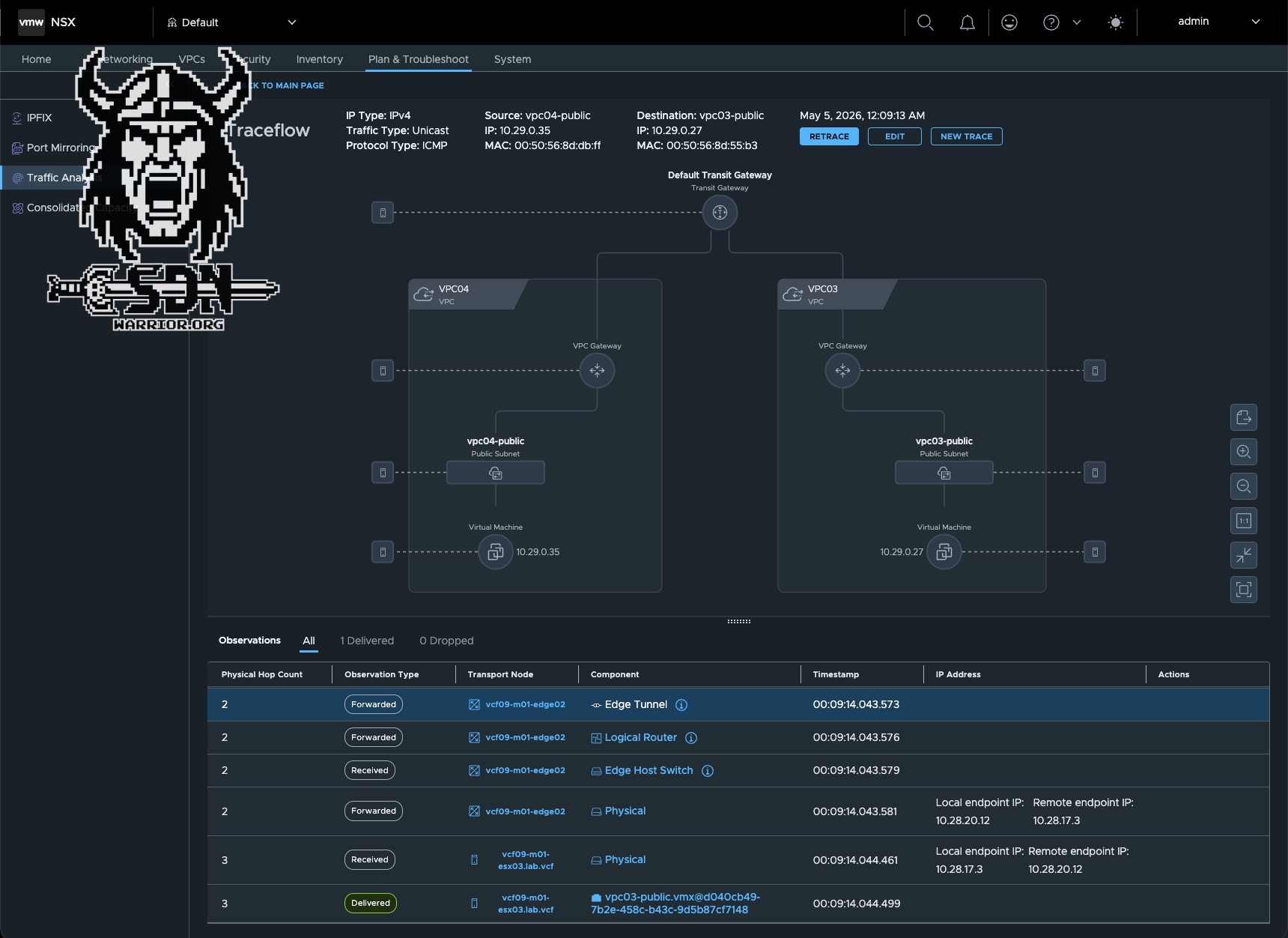
But where does this blocking actually take place?
The answer is quite simple. The policy is enforced on the transit gateway, which is why the policies only work within a single transit gateway. If traffic from another VPC passes through a second transit gateway, the policy does not apply, and the traffic is treated as if it came from an external system.
So what do we do with this now?
To be honest, it’s not that simple; at first glance, it offers a kind of enhanced isolation for VPCs within the transit gateway. Of course, this feature doesn’t replace vDefend, but depending on your network architecture, it can provide significant added value. You just have to follow a few rules. For example, you need to consider whether and how you want to use the promiscuous policy.
One possible scenario, for example, would be isolating specific VKS Kubernetes clusters by strictly using separate communities and VPCs here. In this case, you don’t need to worry about isolation between the Kubernetes clusters, as the connectivity policies handle that. Because the Kubernetes clusters are in different VPCs with different communities, they cannot access public services from other VPCs in diffrent communities. Specifically, this means that even if the Kubernetes workload is accessible to the public, it cannot be accessed by another VPC unless that VPC has a promiscuous policy or is in the same community.
In my opinion, that’s already a good use case. You could also isolate test environments from one another without having to purchase vDefend licenses. In combination with the Stateless Gateway Firewall (which currently requires no licenses), this allows you to set up a secure test system—or multiple test systems—that cannot communicate with one another. I think more possibilities will emerge over time. There are also the VPC Security Profiles I briefly mentioned, but that’s a topic for another blog post.
Update
Unfortunately, I need to correct my article slightly, because the situation has since become clear: VPC Connectivity Policies are, unfortunately, not license-free! Even though licensing is not yet enforced in VCF 9.1.0, the feature may not be used without the appropriate license.