VCF 9.1.1 - Password Managment
Passwords: the admin's bane. Everyone hates them, but they have to be done. Since VCF comes with a bunch of passwords and a bewildering number of options, I'll try to shed some light on the chaos here.
2894 Words // ReadTime 13 Minutes, 9 Seconds
2026-11-03 21:00 +0100
Introduction
My favorite topic after certificates is, of course, passwords, and since VCF has always had a habit of forcing you to change your password – and since VCF 9.x does things a bit differently – it’s time to take a closer look at this topic. A little spoiler: it won’t be easy. But all in good time – I’m trying to shed a little light on the password jungle here and show what works, what doesn’t, and what you can do.
Not all passwords are the same.
First, we need to determine which password or type of account we’re talking about. There are, in fact, three different types of accounts.
| Account Type | Description | Notes |
|---|---|---|
| Local (OS) accounts | Accounts provisioned directly in the operating system of a virtual appliance, primarily used for secure shell (SSH) access. | Examples: root, vcf |
| Application accounts | Accounts provisioned for interactive logins with access to the application’s UI and API. | Some VCF components also use application accounts, such as administrator@vsphere.local, for inter-component communication. |
| Service accounts | System-managed accounts provisioned for inter-component communication. | Passwords are managed through automated mechanisms. Examples: svc-vcf-*, svc-sddcm-* |
By the way, this is an official classification by Broadcom. And since we have a hodgepodge of very different products here, all of which were marketed under the VCF umbrella, we naturally don’t have a standardized way to manage the passwords. But to be fair, it has improved with VCF 9.1. Now that we’ve clarified that, we can take a look at the tools VCF provides for reading or changing passwords.
Password Management in SDDC Manager
Yes, the SDDC is still an important component in VCF 9.1.x – they say it’s dead, but it’s still going strong. The SDDC offers us various options. Maybe I’ll start with the simple UI options. Three types of actions are supported: rotate, remediate, and update. Remediate and update are often confused. An update sets a new password; this requires both the old and the new password. Remediate changes the password in the database if a password has been changed outside the SDDC workflow or if a password is marked as “disconnected” for any reason. Manual password rotation via the UI and via the API is supported for the following accounts:
Password Rotation via SDDC Manager UI
| VCF Component | Managed Accounts |
|---|---|
| ESXi Hosts | root |
| vCenter Server | root |
| vCenter Single Sign-On (SSO) | administrator@vsphere.local |
| NSX Manager | root, admin, audit |
| NSX Edge Nodes | root, admin, audit |
| SDDC Manager | backup |
Scheduled Password Rotation via SDDC Manager UI
In addition to manually controlled password rotation, the SDDC also supports automated password rotation.
| VCF Component | Managed Accounts | Supported Rotation Intervals |
|---|---|---|
| vCenter Server | root |
30, 60, or 90 days |
| NSX Manager | root, admin, audit |
30, 60, or 90 days |
| NSX Edge Nodes | root, admin, audit |
30, 60, or 90 days |
| SDDC Manager | backup |
30, 60, or 90 days |
Note: Custom intervals are also possible, but not through the UI.
Additional Service Accounts Exposed via SDDC Manager API
In addition to the passwords that can be managed in the UI, there are other service passwords that can only be rotated or updated via the API.
| VCF Component | Managed Accounts | Automatic Rotation Policy |
|---|---|---|
| ESXi Hosts | svc-vcf-* |
Not exposed in API response |
| vCenter Server | svc-sddcm-*@vsphere.local |
Every 30 days |
| NSX Manager | svc-sddcm-* |
Every 30 days |
Just for testing purposes, I’ll show an example of a rotate operation via the API here. Since I’m lazy, I used the graphical tools in the SDDC Manager. To perform the rotate, you need a CredentialsUpdateSpec, which must be included as a JSON body. The API endpoint is PATCH /v1/credentials. An example spec would look like this:
{
  "operationType": "ROTATE",
  "elements": [
    {
      "resourceName": "esx01.lab.sdn-warrior.cloud",
      "resourceType": "ESXI",
      "credentials": [
        {
          "credentialType": "SSH",
          "accountType": "SERVICE",
          "username": "svc-vcf-esx01"
        }
      ]
    }
  ]
}
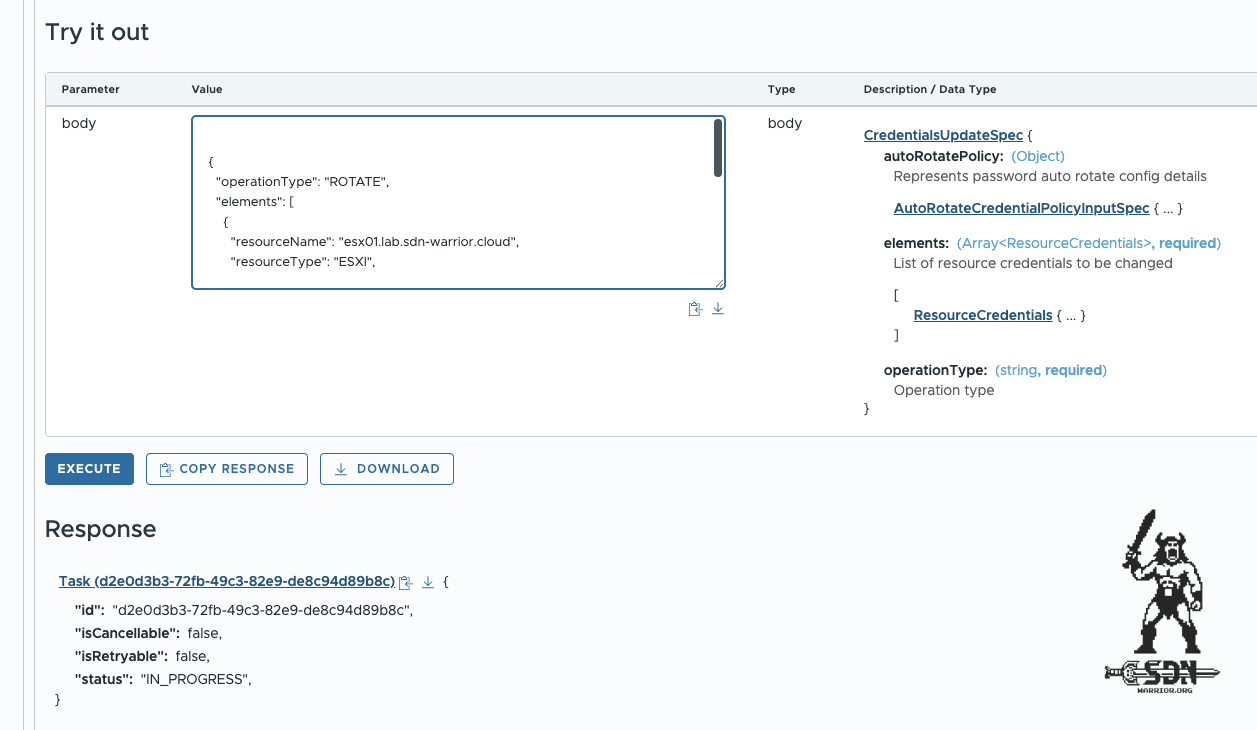
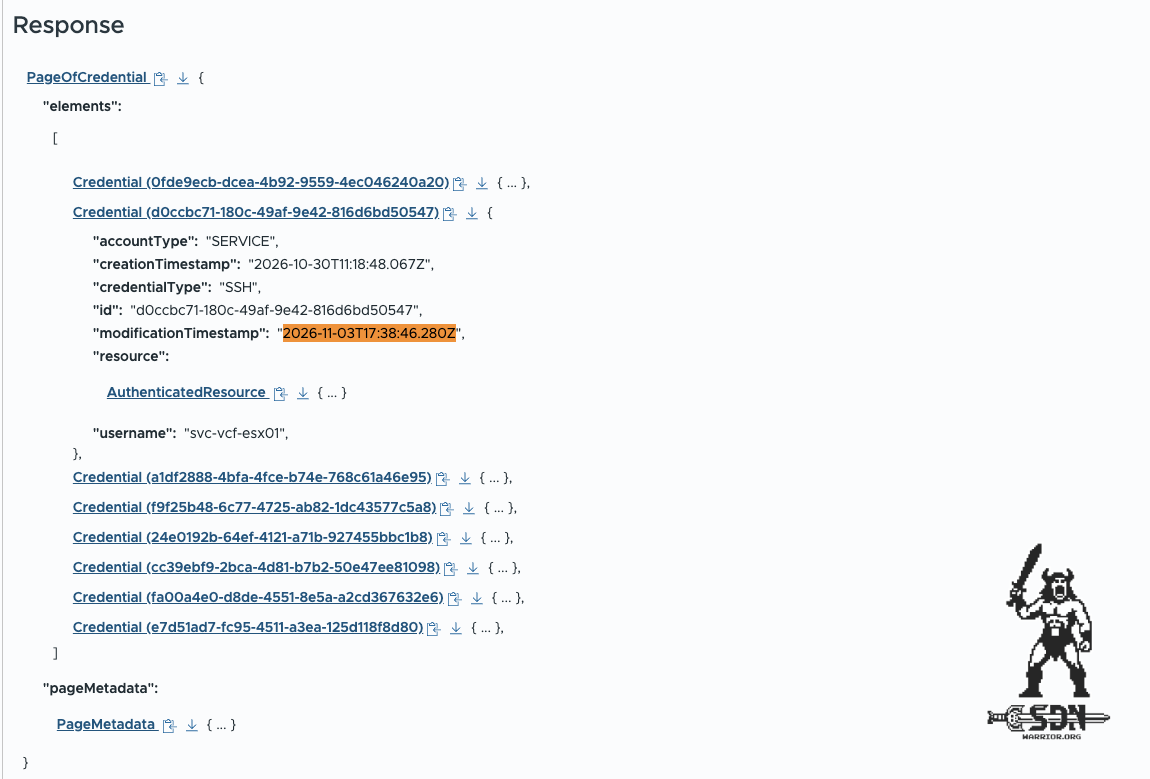
Using the API endpoint GET /v1/ credentials/d0ccbc71-180c-49af-9e42-816d6bd50547, I check the account’s last modified date, and as you can see in the screenshot, the account was modified on November 3 (that’s the day I started writing this article – to be honest, I don’t know yet if it’ll be published on that day either. You’ll see that for yourselves then; otherwise, you’ll just have to take my word for it that the account changed its password). Of course, you can also use the same method to update and reset a password. I’ve provided the specifications for a root account here.
Update
{
  "operationType": "UPDATE",
  "elements": [
    {
      "resourceName": "esx01.lab.sdn-warrior.cloud",
      "resourceType": "ESXI",
      "credentials": [
        {
          "credentialType": "SSH",
          "accountType": "USER",
          "username": "root",
          "password": "<NEW_ROOT_PASSWORD>"
        }
      ]
    }
  ]
}
Remediate
{
  "operationType": "REMEDIATE",
  "elements": [
    {
      "resourceName": "esx01.lab.sdn-warrior.cloud",
      "resourceType": "ESXI",
      "credentials": [
        {
          "credentialType": "SSH",
          "accountType": "USER",
          "username": "root",
          "password": "<CURRENT_WORKING_ESXI_ROOT_PASSWORD>"
        }
      ]
    }
  ]
}
SDDC local users
The local SDDC users vcf, root, and backup can be modified via the separate API endpoint PATCH /v1/sddc-manager/local-os-user-accounts , provided they have not yet expired. Of course, we need a customized spec here, and only updates are supported.
{
  "username": "root",
  "oldPassword": "<CURRENT_ROOT_PASSWORD>",
  "newPassword": "<NEW_ROOT_PASSWORD>"
}
If you missed the deadline and your local root or vcf user account has already expired, here are the official recovery instructions via the VM console. https://knowledge.broadcom.com/external/article/323984/how-to-reset-sddc-manager-vcf-and-root-u.html
Retrieve a password using SDDC Manager
This topic is certainly not new to you – for all accounts that I can manage via the SDDC Manager, I can, of course, also retrieve the password. This can be done either via the API endpoint GET /v1/credentials/ or via the lookup_passwords function on the SDDC Manager (via ssh) itself, provided you haven’t locked out the VCF user.
What can VCF Operations do for me?
Well, at first glance, to be honest, not much. But on closer look, it’s a little more than I’d thought. In principle, VCF Operations can unfortunately only update passwords. No remediation, no rotation – which I personally find quite unfortunate. But Operations can, for example, update the root or VCF account of the SDDC Manager. So this might save you some API work, provided you still have the old password. In addition, for some service accounts, the password can be rotated via the integration if system-managed accounts are used. This is the default for greenfield deployments, but is generally not the case for brownfield deployments and should be changed.
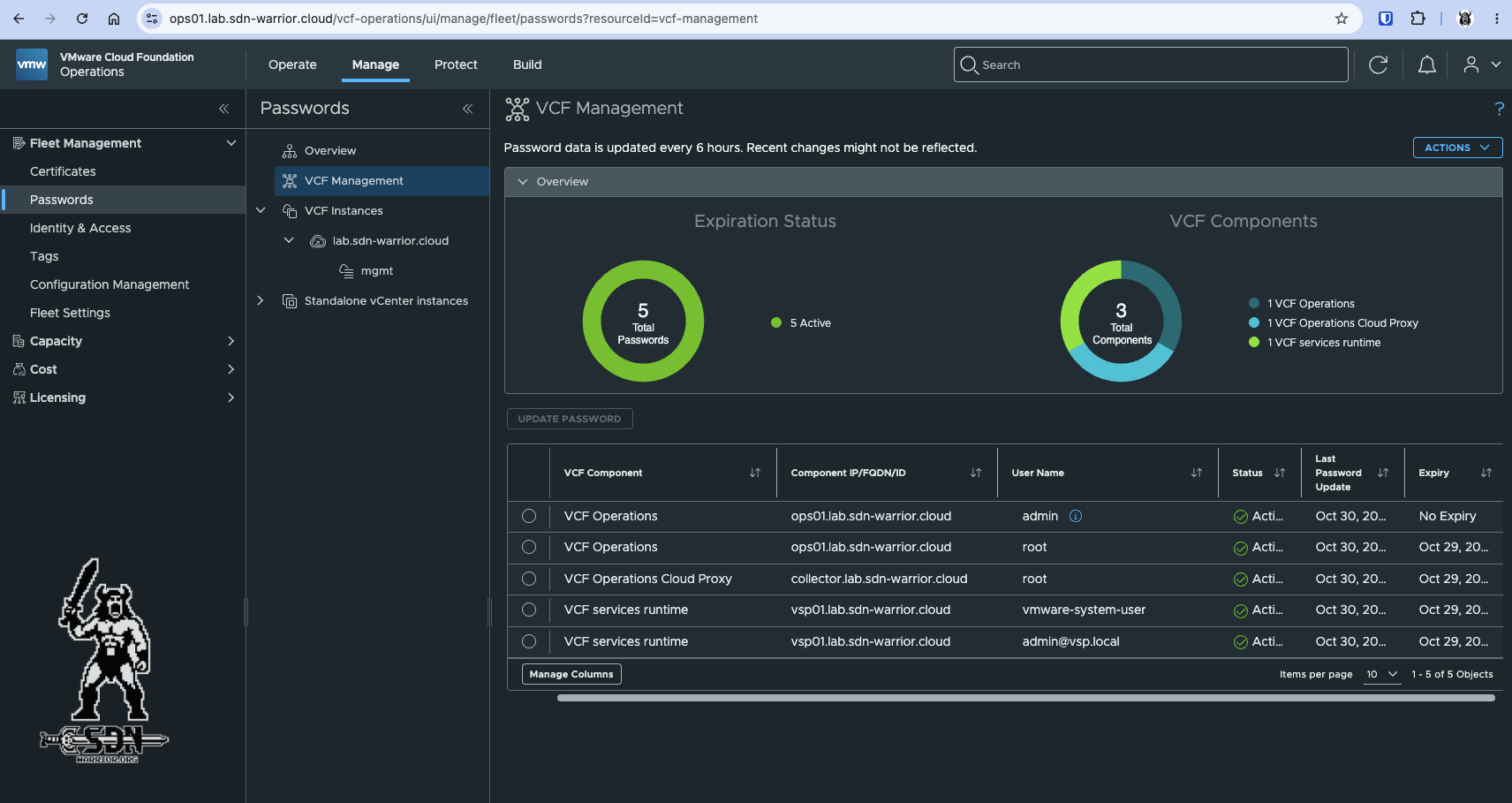
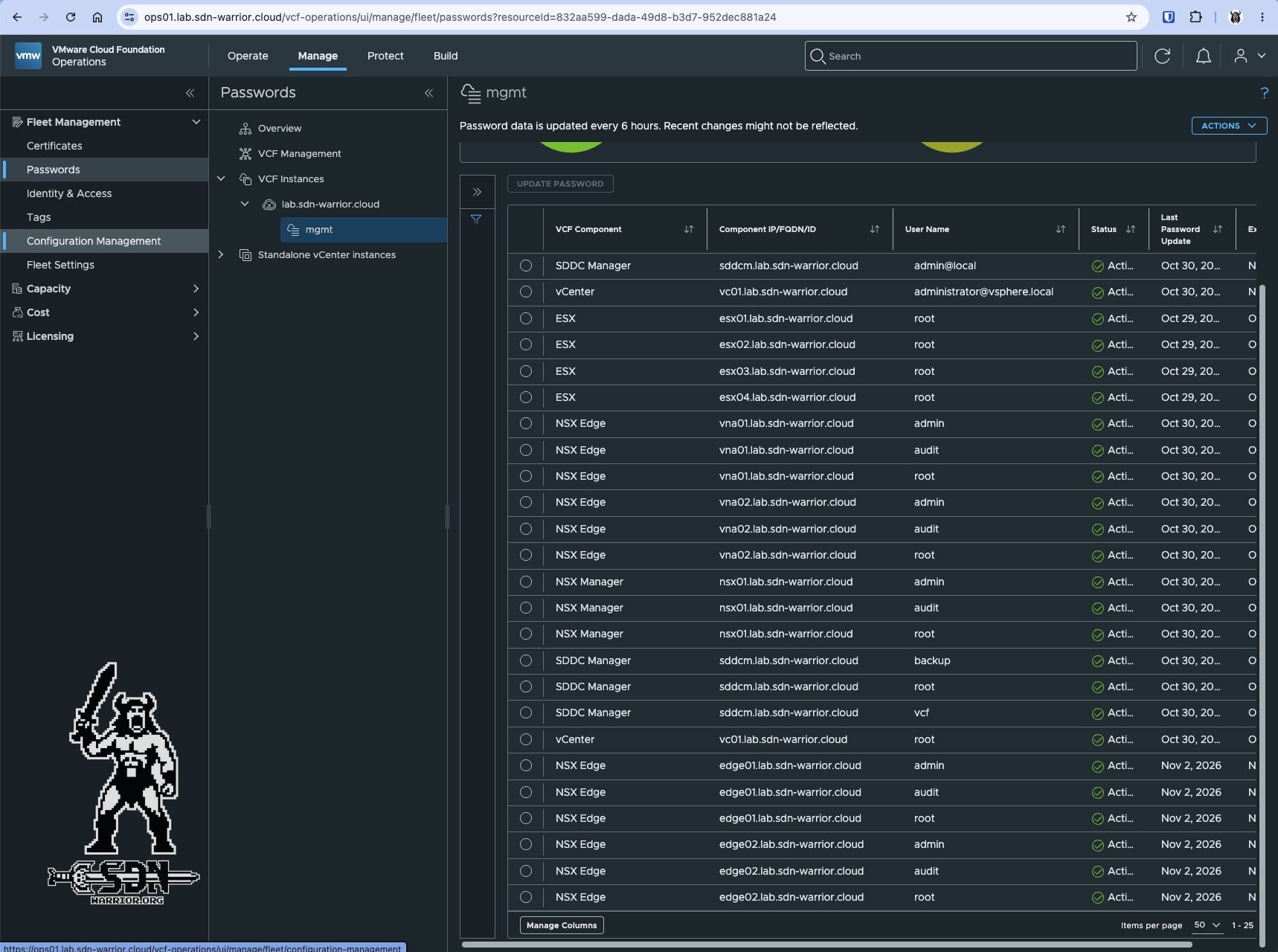
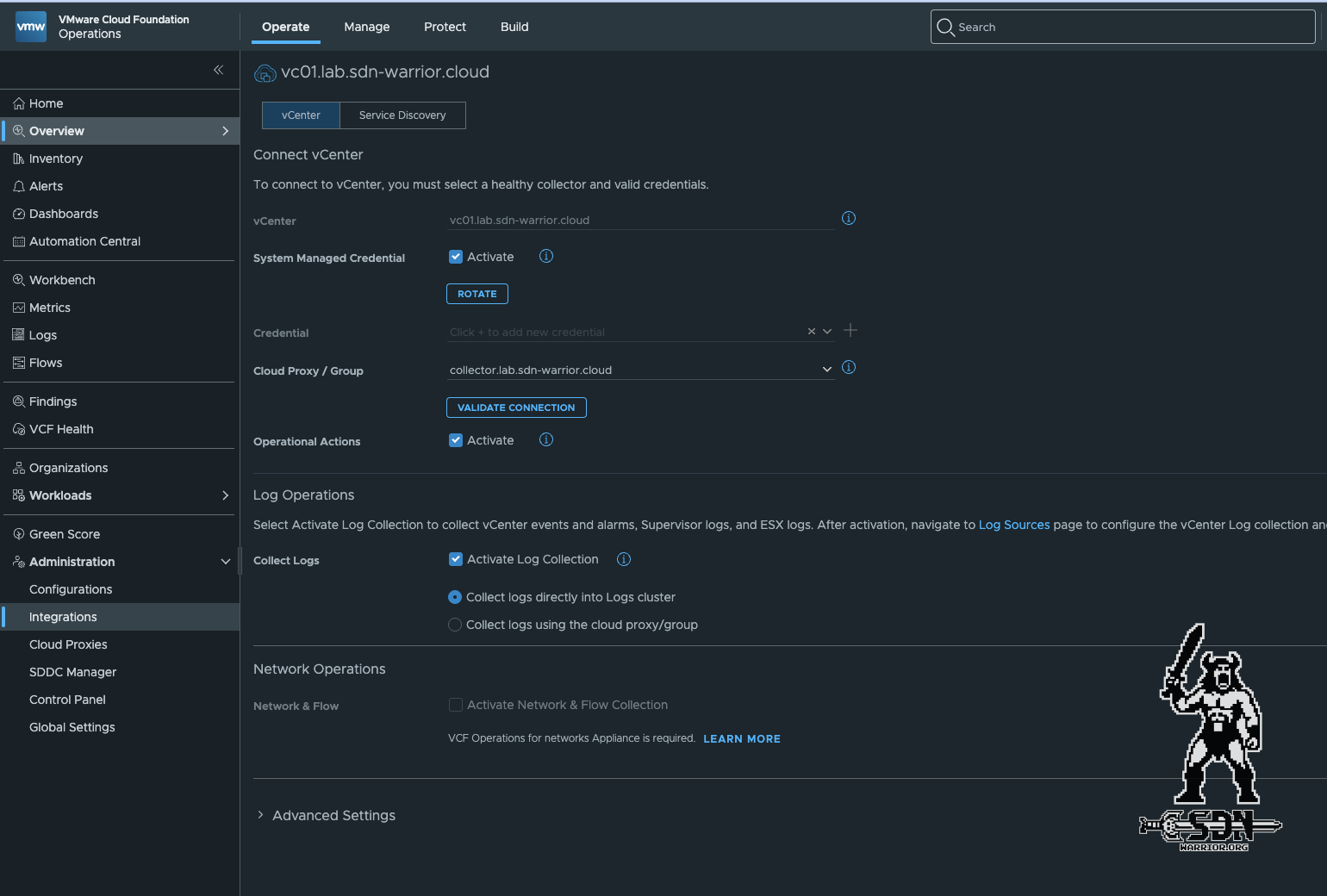
However, when changing a password via Operations, the password policy is automatically enforced and verified. Operations itself does not store any passwords, and as far as I know, there is no way in version 9.1.1 – not even via the internal API – to have Operations display a password. If you want to automate password management, you’ll have no choice but to use an external secret vault where passwords are stored so that you can change them programmatically via the API. In version 9.1, CyberArk is directly supported via plugin integration in Operations, but since I don’t have CyberArk in my lab, I haven’t been able to test this yet.
Password Policys
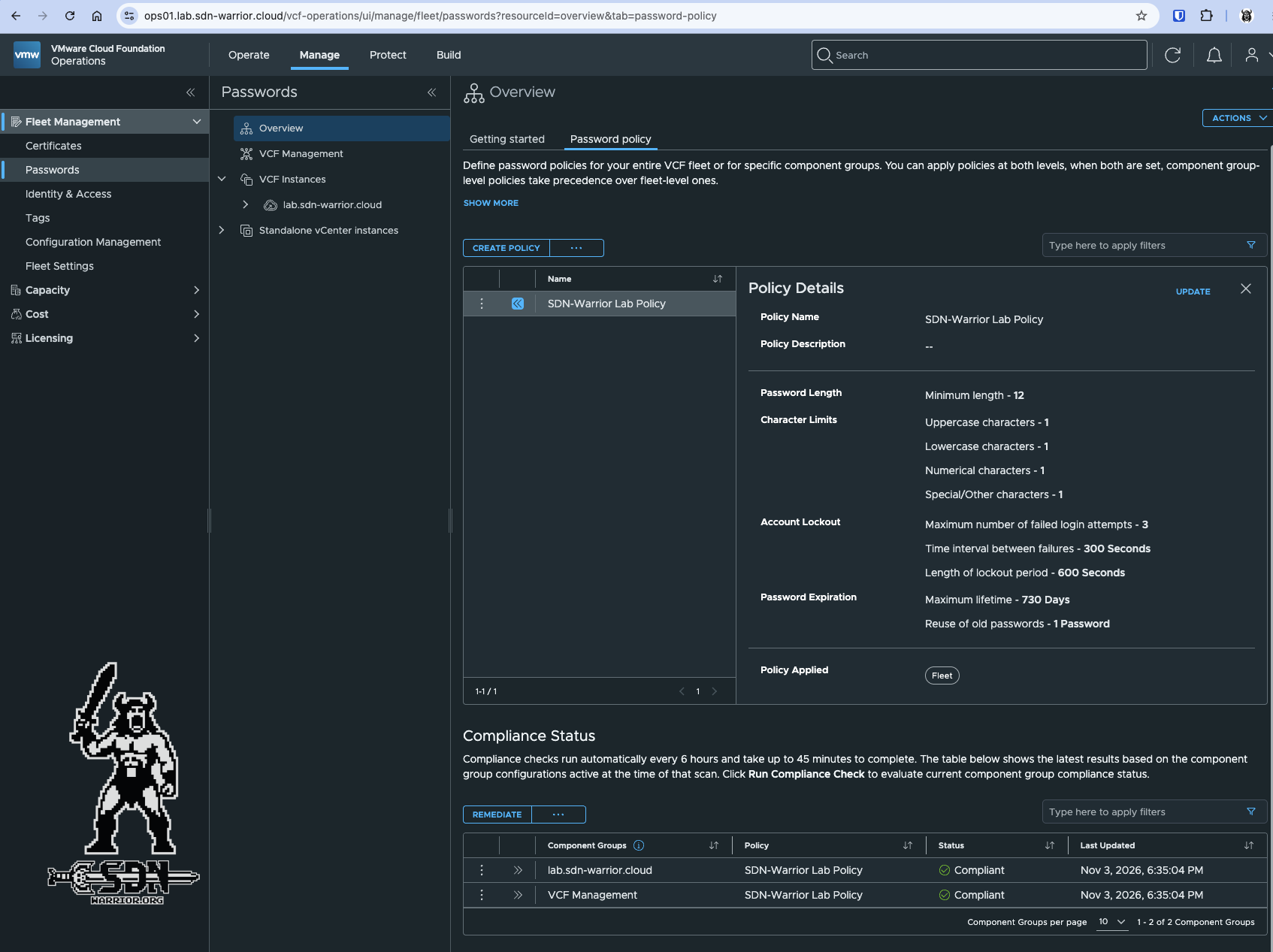
VCF 9.1 introduces another feature: password policies. This feature allows a password policy to be applied either fleet-wide or separately across VCF instances and VCF Management (fleet components). The feature can be found under Manage -> Fleet Management -> Passwords -> Password Policy in VCF Operations. You can configure the minimum password length, character limits, account lockout parameters, and password expiration. By the way, this is a very convenient way to avoid having to constantly deal with expired passwords in the lab, especially when it’s not always turned on.
Full Account List for VCF 9.1.x
It’s fun — not!
| VCF Component | Account | Description | Managed by |
|---|---|---|---|
| ESX | root | Local OS account; OS-level access; default expiry: Never; password generated during deployment | VCF Operations UI/API: Update; SDDC Manager UI/API: Update, Rotate, Remediate, Password Lookup |
| vCenter | root | Local OS account; OS-level and VAMI access; default expiry: 90 days; password generated during deployment | VCF Operations UI/API: Update; SDDC Manager UI/API: Update, Rotate, Remediate, Password Lookup, Scheduled Rotation |
| vCenter | administrator@vsphere.local | vCenter SSO account; application and API access; default expiry: Never; password generated during deployment; password policy not enforced by default | Manual rotation requires an additional VCF Admin account |
| NSX Global Manager | root | Local OS account; OS-level access; default expiry: 90 days; password generated during deployment | NSX Global Manager UI/API: Manual |
| NSX Global Manager | admin | Local appliance account; OS, API, and application access; default expiry: 90 days; password generated during deployment | NSX Global Manager UI/API: Manual |
| NSX Global Manager | audit | Local appliance account; OS, API, and application access; default expiry: 90 days; password generated during deployment | NSX Global Manager UI/API: Manual |
| NSX Local Manager | root | Local OS account; OS-level access; default expiry: 90 days; password generated during deployment | VCF Operations UI/API: Update; SDDC Manager UI/API: Update, Rotate, Remediate, Password Lookup, Scheduled Rotation |
| NSX Local Manager | admin | Local application account; OS, API, and application access; default expiry: 90 days; password generated during deployment | VCF Operations UI/API: Update; SDDC Manager UI/API: Update, Rotate, Remediate, Password Lookup, Scheduled Rotation |
| NSX Local Manager | audit | Local application account; read-only application access; default expiry: 90 days; password generated during deployment | VCF Operations UI/API: Update; SDDC Manager UI/API: Update, Rotate, Remediate, Password Lookup, Scheduled Rotation |
| NSX Edge | root | Local OS account; OS-level access; default expiry: 90 days | VCF Operations UI/API: Update; SDDC Manager UI/API: Update, Rotate, Remediate, Password Lookup, Scheduled Rotation |
| NSX Edge | admin | Local appliance account; OS, API, and application access; default expiry: 90 days | VCF Operations UI/API: Update; SDDC Manager UI/API: Update, Rotate, Remediate, Password Lookup, Scheduled Rotation |
| NSX Edge | audit | Local appliance account; read-only application access; default expiry: 90 days | VCF Operations UI/API: Update; SDDC Manager UI/API: Update, Rotate, Remediate, Password Lookup, Scheduled Rotation |
| NSX Virtual Network Appliance | root | Local OS account; OS-level access; default expiry: 90 days | VCF Operations UI/API: Update; SDDC Manager UI/API: Update, Rotate, Remediate, Password Lookup, Scheduled Rotation |
| NSX Virtual Network Appliance | admin | Local appliance account; OS, API, and application access; default expiry: 90 days | VCF Operations UI/API: Update; SDDC Manager UI/API: Update, Rotate, Remediate, Password Lookup, Scheduled Rotation |
| NSX Virtual Network Appliance | audit | Local appliance account; OS-level and read-only application access; default expiry: 90 days | VCF Operations UI/API: Update; SDDC Manager UI/API: Update, Rotate, Remediate, Password Lookup, Scheduled Rotation |
| SDDC Manager | vcf | Local OS account; OS-level access; default expiry: 365 days; password generated during deployment | VCF 9.1: Manual via OS; VCF 9.1.1: VCF Operations UI/API |
| SDDC Manager | root | Local OS account; OS-level access; default expiry: 365 days; password generated during deployment | VCF 9.1: Manual via OS; VCF 9.1.1: VCF Operations UI/API |
| SDDC Manager | backup | Local OS account; OS-level access; default expiry: 365 days; password generated during deployment | VCF Operations UI/API: Update; SDDC Manager UI/API: Update, Rotate, Remediate, Password Lookup, Scheduled Rotation |
| SDDC Manager | admin@local | Application account; API access; default expiry: Never; password generated during deployment | VCF 9.1: Manual via SDDC Manager API; VCF 9.1.1: VCF Operations UI/API |
| VCF Operations | root | Local OS account; OS-level access; default expiry: 90 days; password generated during deployment | VCF Operations UI/API |
| VCF Operations | admin | Application account; API and application access; default expiry: Never; password generated during deployment | VCF Operations UI/API |
| Cloud Proxy | root | Local OS account; OS-level access; default expiry: 90 days; password generated during deployment | VCF Operations UI/API |
| VCF Operations Orchestrator (Standalone) | root | Local OS account; OS-level access; default expiry: Never | Manual via OS |
| VCF Operations Orchestrator (Standalone) | admin | Local appliance account; API and application access; default expiry: Never | Manual via OS |
| VCF Operations for Networks | root | Local OS account; OS-level access; default expiry: Never | Manual via OS |
| VCF Operations for Networks | admin@local | Application account; API and application access; default expiry: Never | VCF Operations UI/API |
| VCF Operations for Networks | support | Local OS account; OS-level access; default expiry: Never | VCF Operations UI/API |
| VCF Operations for Networks | consoleuser | Local appliance account; CLI-level access; default expiry: Never | VCF Operations UI/API |
| VCF Operations for Networks Collector | support | Local OS account; OS-level access; default expiry: Never | VCF 9.1: Manual via OS; VCF 9.1.1: VCF Operations UI/API |
| VCF Operations for Networks Collector | consoleuser | Local appliance account; CLI-level access; default expiry: Never | VCF 9.1: Manual via OS; VCF 9.1.1: VCF Operations UI/API |
| VCF Operations HCX | root | Local OS account; OS-level access; default expiry: Never | VCF Operations UI/API; HCX Management Pack required |
| VCF Operations HCX | admin | Local appliance account; API and application access; default expiry: Never | HCX Management Pack required for VCF Operations password management |
| VCF Management Services | admin@vsp.local | Local appliance account; OS and application access; default expiry: 365 days; password identical to vmware-system-user | Manual via VCF Management Services |
| VCF Management Services | vmware-system-user | Local appliance account; OS and application access; default expiry: 365 days; password generated during deployment | Manual via VCF Management Services |
| VCF Automation | admin | System organization administrator; default expiry: Never; password generated during deployment | VCF Operations UI/API |
| VCF Automation | admin@vsp.local | Local appliance account; OS and application access; default expiry: 365 days; password generated during deployment | VCF Operations UI/API |
| VCF Automation | vmware-system-user | Local appliance account; OS-level access; default expiry: 365 days; password generated during deployment | VCF Operations UI/API |
| vSphere Supervisor | vmware-system-user | Local appliance account; OS-level access; stored in a control plane namespace secret; default expiry: Never | Manual via Kubernetes Secrets |
| Protection and Recovery | root | Local OS account; OS-level access; default expiry: Never | Manual via OS |
| Protection and Recovery | admin | Local appliance account; API and application access; default expiry: Never | Manual via VAMI |
| VMware Avi Load Balancer | admin | Local appliance account; API and application access; default expiry: Never | VCF Operations UI/API |
| VMware Avi Load Balancer | vcfops-admin | Local application account; API and application access; default expiry: Never; used for VCF Operations integration | VCF Operations UI/API |
Note: The following services are included under VCF Management Services:
- VCF Services Runtime
- Fleet Lifecycle
- SDDC Lifecycle
- Salt RAAS
- Salt Master
- Telemetry
- Log Management
- Identity Broker
- License Server
VCF Operations Orchestrator
The root and admin accounts listed for VCF Operations Orchestrator apply only to standalone instances manually deployed using the appliance OVA. In a default VCF deployment, Orchestrator runs as an embedded component of VCF Automation. These standalone accounts do not apply to embedded deployments.
VCF Operations HCX
Password management for HCX local accounts through VCF Operations requires the VCF Operations Management Pack for HCX.
Service Accounts
| VCF Component | Account | Description | Managed by |
|---|---|---|---|
| ESX | svc-vcf-ESX-hostname | SDDC Manager → ESX host | SDDC Manager UI/API |
| SDDC Manager | svc-sddc-manager-hostname-hcx-hostname-uuid | VCF Operations HCX → SDDC Manager; default expiry: Never | System managed |
| SDDC Manager | svc-vcf-sddc-lcm-SDDC_MANAGER-uuid | SDDC Lifecycle → SDDC Manager; Administrator role; default auto-rotation: 30 days; default expiry: 90 days; initially named svc-sddclcm-sddcm-uuid, renamed after first auto-rotation | System managed |
| vCenter | svc-sddc-manager-hostname-vcenter-hostname@vsphere.local | SDDC Manager → vCenter; Administrator role; default auto-rotation: 30 days; default expiry: 90 days | System managed; SDDC Manager UI/API; scheduled rotation supported |
| vCenter | svc-nsx-manager-hostname-vcenter-hostname@vsphere.local | NSX Manager → vCenter; Administrator role; default auto-rotation: 30 days; default expiry: 90 days | System managed |
| vCenter | svc-fleet-management-hostname-vcenter-hostname@vsphere.local | VCF Operations Fleet Management → vCenter; Administrator role; default auto-rotation: 30 days | System managed |
| vCenter | svc-ops-vc-ops-cluster-uid@vsphere.local | VCF Operations Fleet Management → vCenter; Administrator role; default auto-rotation: 30 days | System managed |
| vCenter | svc-vcfa_uid@vsphere.local | VCF Operations → vCenter; Administrator role; default auto-rotation: 30 days | System managed |
| vCenter | svc-vcfsp-vc-uid@vsphere.local | VCF Services Platform → vCenter; VCF Services Runtime role; default auto-rotation: 30 days | System managed |
| vCenter | svc-vcfsp-vc-admin-uid@vsphere.loca | VCF Services Platform → vCenter; VCF Services Platform Admin role; default auto-rotation: 30 days | System managed |
| vCenter | svc-hcx-hostname-vc-hostname-hcx-uuid | VCF Operations HCX → vCenter; Administrator role | System managed |
| NSX Local Manager | svc-sddc-manager-hostname-nsx-vip-hostname-uid | SDDC Manager → NSX; Enterprise Admin role; default auto-rotation: 30 days; default expiry: 90 days | System managed |
| NSX Local Manager | svc-ops-nsx-uid | VCF Operations → NSX; Enterprise Admin role | System managed |
| NSX Local Manager | svc-ni-nsx-uid | VCF Operations for Networks → NSX | System managed |
| NSX Local Manager | svc-vcfa_uid | VCF Automation → NSX | System managed |
| VCF Operations | svc-salt-ops-uid | Salt RaaS → VCF Operations | System managed |
| VCF Operations | svc-ops-li-ops-uid | Log Management → VCF Operations | System managed |
| VCF Operations | svc-ops-ni-ops-uid | VCF Operations for Networks → VCF Operations | System managed |
| Log Management | svc-ops-ops-li-uid | VCF Operations → Log Management | System managed |
| VCF Operations for Networks | svc-ops-ops-ni-uid | VCF Operations → VCF Operations for Networks | System managed |
| Salt RaaS | svc-ops-salt-uid | VCF Operations → Salt RaaS | System managed |
Personal Thoughts
As someone who’s once again dealing more frequently with operational issues, I have to say that I don’t think the password management solution is well-designed. It’s still very clear here that VCF 9 needs to be more tightly integrated. The fact that there’s no way to perform a password rotation via the Operations UI or API is also very frustrating.
On the other hand, I really like the password policy, although I’d like to see a bit more granularity so that the policy could perhaps be broken down to the cluster level. It’s clear that in 2026, passwords are still no fun, and the flood of accounts within VCF doesn’t make things any easier.
If anyone knows a way to retrieve the passwords through Operations, please send me a message. Cheers!