VCF 9.1.1 - DTGW & VNA: the route controller within me - Part 2
In this article, I'll take another look at Route Controller, since additional features were added in VCF 9.1.1. Direct prefix routing and active/active mode are among the new features that have been introduced.
vcf9.1.1vcf9.1nsxvpcvnavxlanVyOS
5485 Words // ReadTime 24 Minutes, 55 Seconds
2026-10-12 01:00 +0200
Introduction
Sometimes sequels are better than the first one – take Batman, for example. The Dark Knight was already a blast. Maybe this second article about the route controller will go just as well, and it might even be more popular with you guys than the first one. Anyway, my vacation is over, and now I finally have more time to take a closer look at VCF 9.1.1 – and wow, what can I say? I actually thought VCF 9.1.1 would just be a minor update, but there’s been a lot going on in VCF Networking in particular. And just like that, we’re back in the networking rabbit hole, and I’ve been tinkering with a test setup for several days now to properly demonstrate the new features of the Route Controller.
However, I won’t be covering all the new features in VCF Networking in this article. NSX Tepless setup and other topics may be covered in a separate article. I also won’t be explaining the physical aspects in every last detail; that would go beyond the scope of this article and the capabilities of my lab. I built my “physical” fabric for EVPN VXLAN using VyOS VMs and standalone Proxmox servers – but more on that later. I also need to apologize a bit – unfortunately, some of my drawings have turned out so large that they’re hard to see in the gallery view, but I’ll post links to them in full-screen mode.
And if you’re now wondering, “What exactly is the Route Controller, and what on earth is this guy talking about?”, then I recommend checking out my article on the VCF 9.1 Route Controller, because in it I cover a lot of the basics that will be more or less essential for this article.
Enough with the introduction, so grab a cup of coffee – or better yet, a whole pot – because we’re going to dive deep into the subject once again to take a closer look at the changes.
VyOS EVPN Fabric
Now that that’s clear, we can take a closer look at the test setup. For my tests, I need an external EVPN/VXLAN fabric that will represent a physical network fabric. Since my MikroTik switches currently don’t support Type 5 routes, I decided to use a fabric based on VyOS VMs. I’m using two Proxmox servers running on Intel NUCs. These aren’t in a cluster, so test VMs can’t migrate between the hosts. Why Proxmox? It’s relatively simple – I don’t have enough vSphere licenses. For the functionality I need – namely, hosting a VyOS router and one test VM per server – this isn’t a problem. Since the setup is a bit more complex, I’m trying to break it down into smaller parts so I can gradually work my way toward the big picture. That’s why, at this point, I’ll focus only on the VXLAN fabric and won’t go into detail about the route controller setup just yet.
| Component | Role | IP Address | BGP AS |
|---|---|---|---|
| VyOS-01-BGW | Border Gateway / Leaf | 10.28.4.100 | 64515 |
| VyOS-02-Leaf | Leaf | 10.28.4.101 | 64515 |
| Alpine-PR-01 | Test VM connected to VyOS-01 | 192.168.250.10/24 | — |
| Alpine-PR-02 | Test VM connected to VyOS-02 | 192.168.250.11/24 | — |
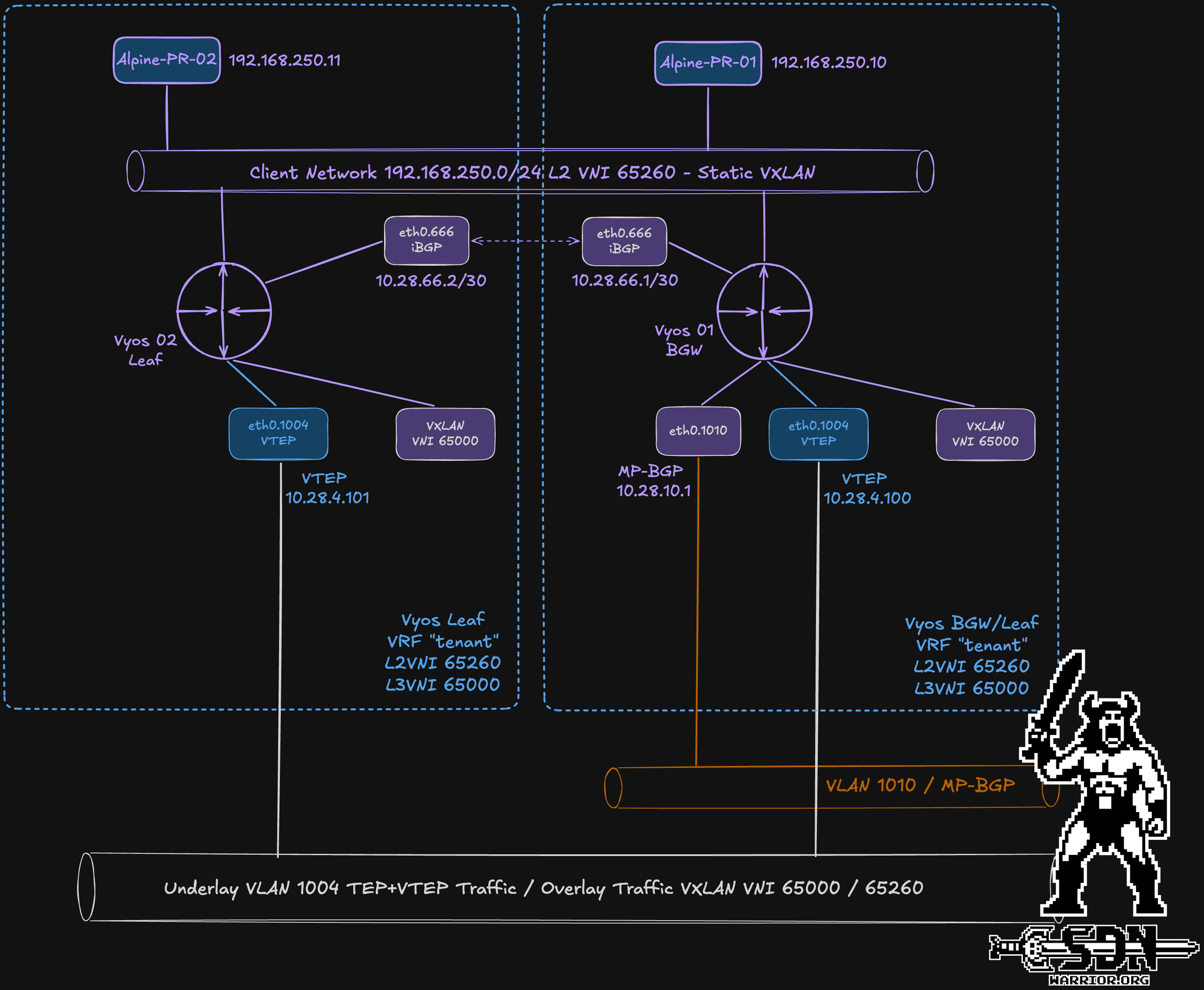
The VyOS-01-BGW router serves a dual role. It acts as a leaf, connecting the Alpine-PR-01 test VM to the client network, while also functioning as a border gateway, thereby serving as the central BGP peering point with the NSX route controllers.
VyOS-02 is only a leaf for Alpine-PR-02. In addition, EVPN information is exchanged via an iBGP session (L2VPN EVPN) with VyOS-01-BGW (AS 64515).
The VXLAN configuration uses two VNIs: a Layer 2 VNI (65260), which extends the client segment across both routers, and a Layer 3 VNI (65000), which is associated with the “Tenant” VRF and provides the routing context. Each VNI is connected to its own Linux bridge. For the L2 VNI, I used a static VXLAN remote VTEP for simplicity. The Linux bridge for the L2 VNI is also assigned to the “tenant” VRF so that later, both the test VMs on the physical side and the test VMs in the VPC will belong to the same routing context. Both routers use different export targets, and each imports all routes from the other router. The topic of route targets will become important again later when it comes to configuring the route controller.
VLANs and Interfaces
As you can clearly see in the diagram, I’m using 3 VLANs. Their functions are shown in the table below.
| VLAN ID | Network | Purpose |
|---|---|---|
| 666 | 10.28.66.0/30 | iBGP EVPN peering between VyOS routers |
| 1004 | 10.28.4.0/24 | VXLAN underlay and VTEP/TEP connectivity |
| 1010 | 10.28.10.0/24 | MP-eBGP peering with NSX Route Controllers |
I have listed the interfaces used in the following tables; I have purposely omitted the management interfaces, as they play no role in the test setup.
VyOS-01-BGW
| Interface | IP Address | MTU | Purpose |
|---|---|---|---|
| eth0 | — | 9000 | Physical trunk interface |
| eth0.666 | 10.28.66.1/30 | 9000 | iBGP peering with VyOS-02 |
| eth0.1004 | 10.28.4.100/24 | 9000 | VXLAN underlay / VTEP |
| eth0.1010 | 10.28.10.1/24 | 9000 | MP-eBGP peering with NSX RC cluster |
| eth1 | — | 9000 | Local client access |
| br65260 | 192.168.250.1/24 | 9000 | Client bridge / Tenant L3 interface |
| br65000 | — | 9000 | L3VNI bridge / VRF anchor |
VyOS-02-Leaf
| Interface | IP Address | MTU | Purpose |
|---|---|---|---|
| eth0 | — | 9000 | Physical trunk interface |
| eth0.666 | 10.28.66.2/30 | 9000 | iBGP peering with VyOS-01 |
| eth0.1004 | 10.28.4.101/24 | 9000 | VXLAN underlay / VTEP |
| eth1 | — | 9000 | Local client access |
| br65260 | 192.168.250.2/24 | 9000 | Client bridge / Tenant L3 interface |
| br65000 | — | 9000 | L3VNI bridge / VRF anchor |
The attentive reader may have noticed by now that no AnyCast address has been configured. In a real fabric, you wouldn’t do that. However, since my focus is on the NSX features, I’ve chosen a simple setup that’s heavily customized to my needs. This is the reason behind why the TestVM on VyOS-01 has the bridge IP 192.168.250.1 as its gateway, and TestVM on VyOS-02 uses 192.168.250.2.
Vyos Config
VYOS-01-BGW
set interfaces bridge br65000 description 'L3VNI anchor for tenant VRF'
set interfaces bridge br65000 mac '00:53:00:65:00:00'
set interfaces bridge br65000 member interface vxlan65000
set interfaces bridge br65000 vrf 'tenant'

set interfaces bridge br65260 address '192.168.250.1/24'
set interfaces bridge br65260 description 'Client Network VNI 65260'
set interfaces bridge br65260 member interface eth1
set interfaces bridge br65260 member interface vxlan65260
set interfaces bridge br65260 mtu '9000'
set interfaces bridge br65260 vrf 'tenant'

set interfaces ethernet eth0 mtu '9000'
set interfaces ethernet eth0 vif 666 address '10.28.66.1/30'
set interfaces ethernet eth0 vif 666 description 'VXLAN Underlay to VYOS-02-LEAF'
set interfaces ethernet eth0 vif 666 mtu '9000'
set interfaces ethernet eth0 vif 1004 address '10.28.4.100/24'
set interfaces ethernet eth0 vif 1004 mtu '9000'
set interfaces ethernet eth0 vif 1010 address '10.28.10.1/24'

set interfaces ethernet eth1 description 'Untagged local client network in tenant VRF'
set interfaces ethernet eth1 mtu '9000'

set interfaces vxlan vxlan65000 description 'EVPN L3VNI 65000 toward NSX TGW'
set interfaces vxlan vxlan65000 mtu '1500'
set interfaces vxlan vxlan65000 port '4789'
set interfaces vxlan vxlan65000 source-address '10.28.4.100'
set interfaces vxlan vxlan65000 vni '65000'

set interfaces vxlan vxlan65260 description 'L2 VNI 65260 Client Network to VYOS-02-LEAF'
set interfaces vxlan vxlan65260 mtu '9000'
set interfaces vxlan vxlan65260 port '4789'
set interfaces vxlan vxlan65260 remote '10.28.4.101'
set interfaces vxlan vxlan65260 source-address '10.28.4.100'
set interfaces vxlan vxlan65260 vni '65260'

set protocols bgp address-family ipv4-unicast import
set protocols bgp address-family ipv4-unicast redistribute connected
set protocols bgp address-family ipv4-unicast redistribute static
set protocols bgp address-family l2vpn-evpn advertise ipv4 unicast
set protocols bgp address-family l2vpn-evpn advertise-all-vni
set protocols bgp address-family l2vpn-evpn advertise-default-gw
set protocols bgp address-family l2vpn-evpn default-originate ipv4

set protocols bgp neighbor 10.28.10.100 address-family ipv4-unicast default-originate
set protocols bgp neighbor 10.28.10.100 address-family l2vpn-evpn soft-reconfiguration inbound
set protocols bgp neighbor 10.28.10.100 bfd
set protocols bgp neighbor 10.28.10.100 description 'NSX Route Controller RC-01'
set protocols bgp neighbor 10.28.10.100 remote-as '64520'
set protocols bgp neighbor 10.28.10.100 timers holdtime '180'
set protocols bgp neighbor 10.28.10.100 timers keepalive '60'
set protocols bgp neighbor 10.28.10.100 update-source '10.28.10.1'

set protocols bgp neighbor 10.28.10.101 address-family ipv4-unicast default-originate
set protocols bgp neighbor 10.28.10.101 address-family l2vpn-evpn soft-reconfiguration inbound
set protocols bgp neighbor 10.28.10.101 bfd
set protocols bgp neighbor 10.28.10.101 description 'NSX Route Controller RC-02'
set protocols bgp neighbor 10.28.10.101 remote-as '64520'
set protocols bgp neighbor 10.28.10.101 timers holdtime '180'
set protocols bgp neighbor 10.28.10.101 timers keepalive '60'
set protocols bgp neighbor 10.28.10.101 update-source '10.28.10.1'

set protocols bgp neighbor 10.28.66.2 address-family l2vpn-evpn
set protocols bgp neighbor 10.28.66.2 description 'VYOS-02 EVPN Leaf'
set protocols bgp neighbor 10.28.66.2 remote-as '64515'
set protocols bgp neighbor 10.28.66.2 timers holdtime '180'
set protocols bgp neighbor 10.28.66.2 timers keepalive '60'
set protocols bgp neighbor 10.28.66.2 update-source '10.28.66.1'

set protocols bgp parameters bestpath as-path multipath-relax
set protocols bgp parameters graceful-restart stalepath-time '180'
set protocols bgp parameters no-hard-administrative-reset
set protocols bgp parameters router-id '10.28.10.1'
set protocols bgp system-as '64515'

set vrf name tenant protocols bgp address-family ipv4-unicast import
set vrf name tenant protocols bgp address-family ipv4-unicast redistribute connected
set vrf name tenant protocols bgp address-family ipv4-unicast redistribute static
set vrf name tenant protocols bgp address-family l2vpn-evpn advertise ipv4 unicast
set vrf name tenant protocols bgp address-family l2vpn-evpn advertise-default-gw
set vrf name tenant protocols bgp address-family l2vpn-evpn default-originate ipv4
set vrf name tenant protocols bgp address-family l2vpn-evpn rd '10.28.4.100:10'
set vrf name tenant protocols bgp address-family l2vpn-evpn route-target export '65000:10'
set vrf name tenant protocols bgp address-family l2vpn-evpn route-target import '65000:10'
set vrf name tenant protocols bgp address-family l2vpn-evpn route-target import '65000:20'
set vrf name tenant protocols bgp address-family l2vpn-evpn vni 65000
set vrf name tenant protocols bgp parameters graceful-restart stalepath-time '180'
set vrf name tenant protocols bgp parameters no-hard-administrative-reset
set vrf name tenant protocols bgp parameters router-id '10.28.10.1'
set vrf name tenant protocols bgp system-as '64515'
set vrf name tenant table '100'
set vrf name tenant vni '65000'
VYOS-02-LEAF
set interfaces bridge br65000 description 'L3VNI anchor for tenant VRF'
set interfaces bridge br65000 mac '00:53:00:65:00:02'
set interfaces bridge br65000 member interface vxlan65000
set interfaces bridge br65000 vrf 'tenant'

set interfaces bridge br65260 address '192.168.250.2/24'
set interfaces bridge br65260 description 'Client Network VNI 65260'
set interfaces bridge br65260 member interface eth1
set interfaces bridge br65260 member interface vxlan65260
set interfaces bridge br65260 mtu '9000'
set interfaces bridge br65260 vrf 'tenant'

set interfaces ethernet eth0 mtu '9000'
set interfaces ethernet eth0 vif 666 address '10.28.66.2/30'
set interfaces ethernet eth0 vif 666 description 'VXLAN Underlay to VYOS-01-BGW'
set interfaces ethernet eth0 vif 666 mtu '9000'
set interfaces ethernet eth0 vif 1004 address '10.28.4.101/24'
set interfaces ethernet eth0 vif 1004 description 'EVPN VXLAN VTEP Underlay'
set interfaces ethernet eth0 vif 1004 mtu '9000'

set interfaces ethernet eth1 mtu '9000'

set interfaces vxlan vxlan65000 description 'EVPN L3VNI 65000'
set interfaces vxlan vxlan65000 mtu '1500'
set interfaces vxlan vxlan65000 port '4789'
set interfaces vxlan vxlan65000 source-address '10.28.4.101'
set interfaces vxlan vxlan65000 vni '65000'

set interfaces vxlan vxlan65260 description 'L2 VNI 65260 Client Network to VYOS-01-BGW'
set interfaces vxlan vxlan65260 mtu '9000'
set interfaces vxlan vxlan65260 port '4789'
set interfaces vxlan vxlan65260 remote '10.28.4.100'
set interfaces vxlan vxlan65260 source-address '10.28.4.101'
set interfaces vxlan vxlan65260 vni '65260'

set protocols bgp address-family l2vpn-evpn advertise-all-vni
set protocols bgp neighbor 10.28.66.1 address-family l2vpn-evpn
set protocols bgp neighbor 10.28.66.1 description 'VYOS-01 EVPN Gateway'
set protocols bgp neighbor 10.28.66.1 remote-as '64515'
set protocols bgp neighbor 10.28.66.1 timers holdtime '180'
set protocols bgp neighbor 10.28.66.1 timers keepalive '60'
set protocols bgp neighbor 10.28.66.1 update-source '10.28.66.2'
set protocols bgp parameters router-id '10.28.4.101'
set protocols bgp system-as '64515'

set vrf name tenant protocols bgp address-family l2vpn-evpn rd '10.28.4.101:10'
set vrf name tenant protocols bgp address-family l2vpn-evpn route-target export '65000:20'
set vrf name tenant protocols bgp address-family l2vpn-evpn route-target import '65000:10'
set vrf name tenant protocols bgp address-family l2vpn-evpn route-target import '65000:20'
set vrf name tenant protocols bgp parameters router-id '10.28.4.101'
set vrf name tenant protocols bgp system-as '64515'
set vrf name tenant table '100'
set vrf name tenant vni '65000'
Next, I’ll take care of connecting the route controller. The actual differences aren’t that big, so I won’t go through the setup step by step – I’ll just show you the changes I made. If you need more help, you’ll find it here.
Route Controller in 9.1.1
One of the cool new features is that the Route Controller now supports active/active mode and can scale out to up to 8 nodes. To use this effectively, you need at least two BGW routers. In my setup, I’m using just one router that has MP-BGP peering with both Route Controllers. Not ideal, but hey, it’s a lab.
In general, however, there are a few limitations or prerequisites. In active/active mode, only one MP-BGP interface per Route Controller can be used, even if a Route Controller has three interfaces. A non-configurable interface handles the notification messages during a vMotion operation. Another interface is used for management traffic. This means all three interfaces are in use. The physical fabric must continue to announce a default route, even when fancy features like Direct Prefix Routing are used - I’ll explain what that is later.
Since pictures speak louder than words, I’ve created a diagram and attached some screenshots showing the key settings of the Route Controller. Since the diagram is quite large, it can be downloaded separately.
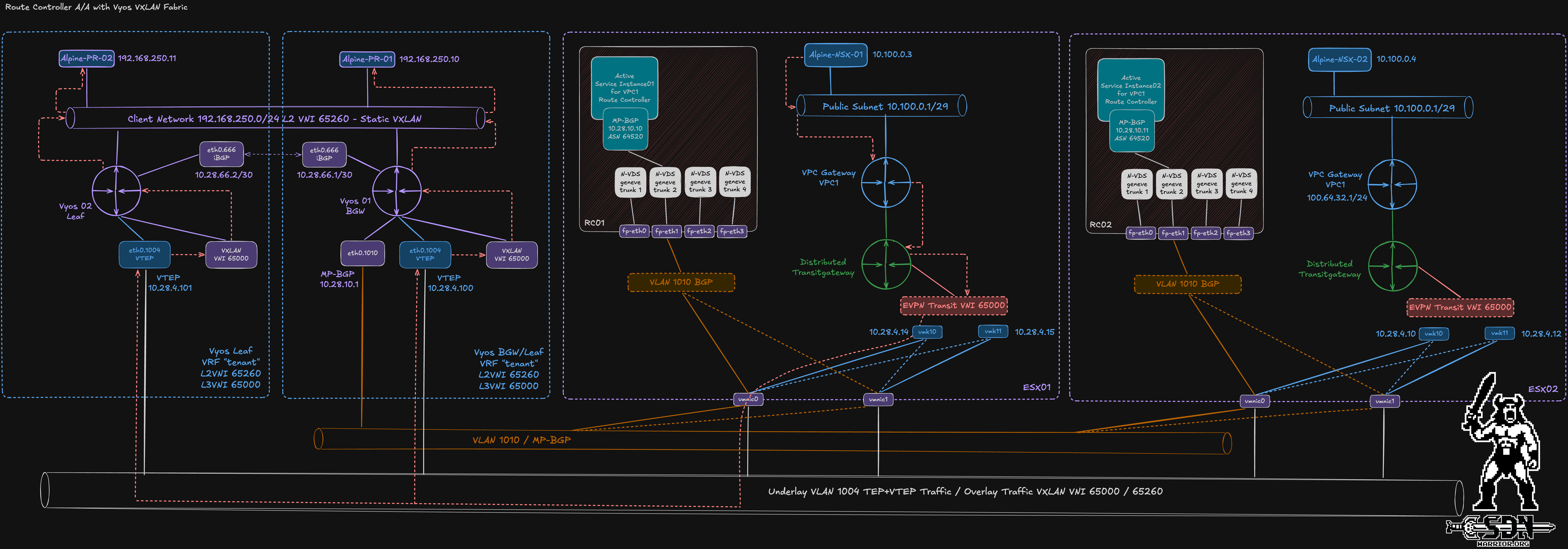
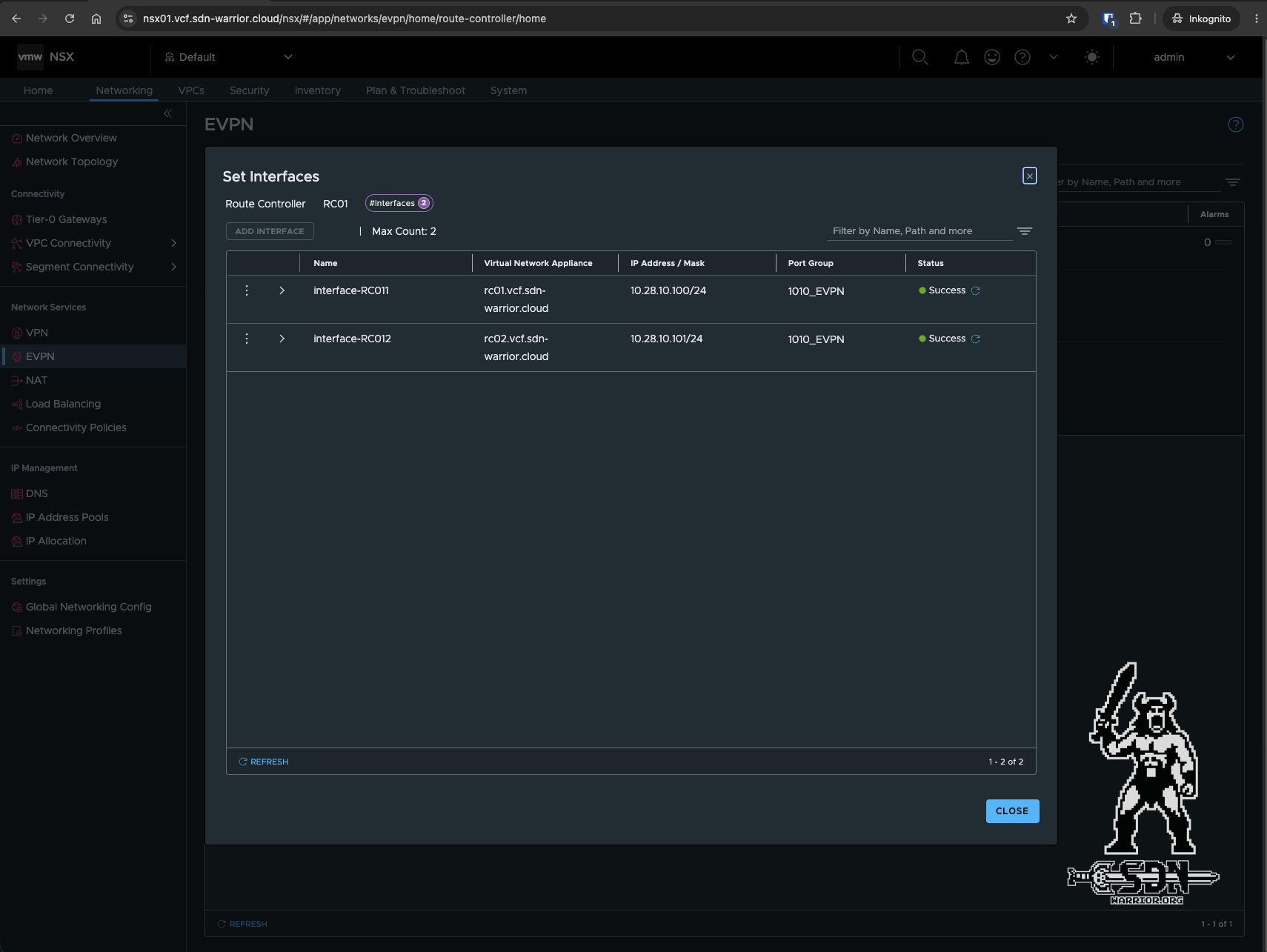
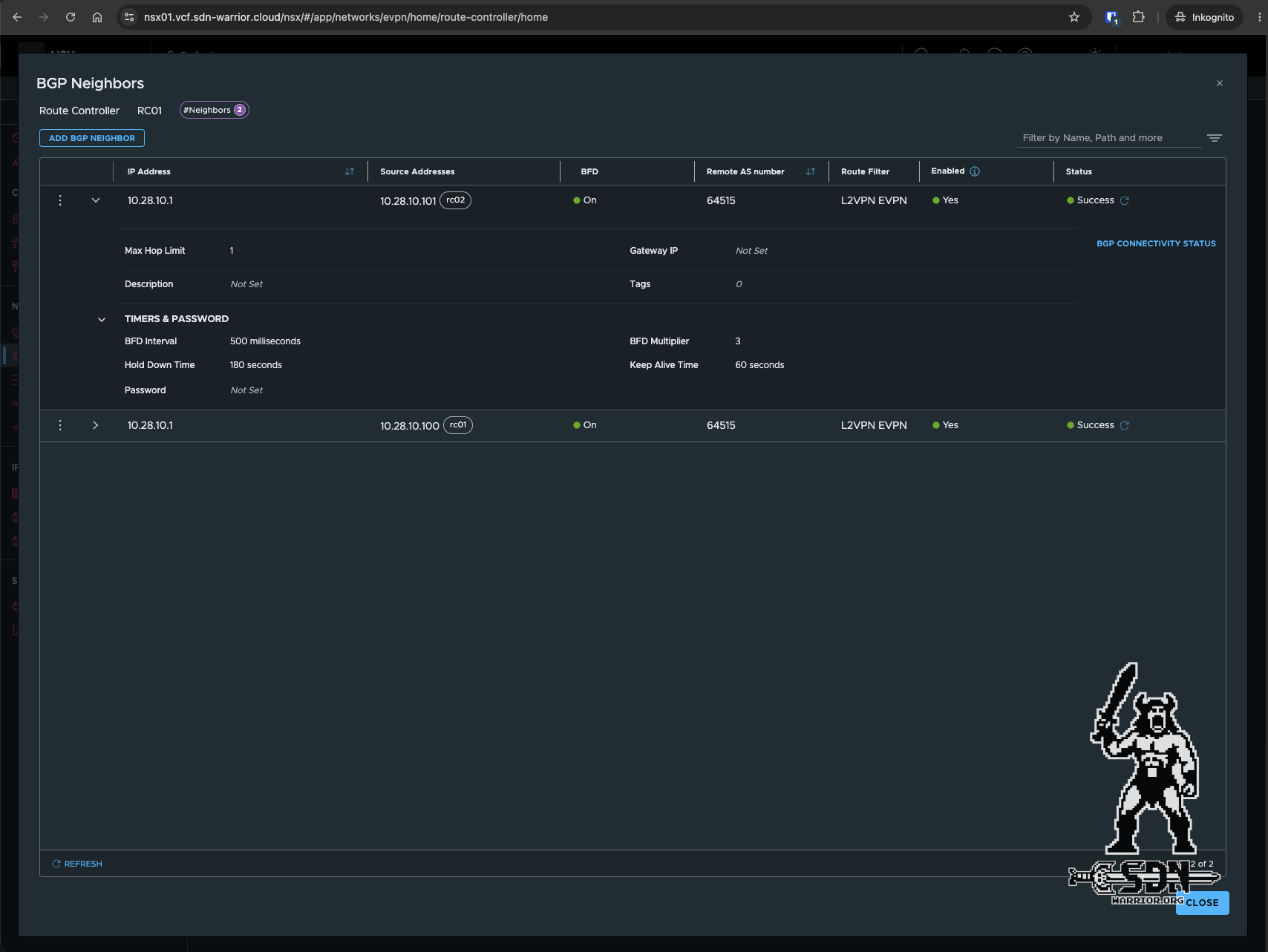
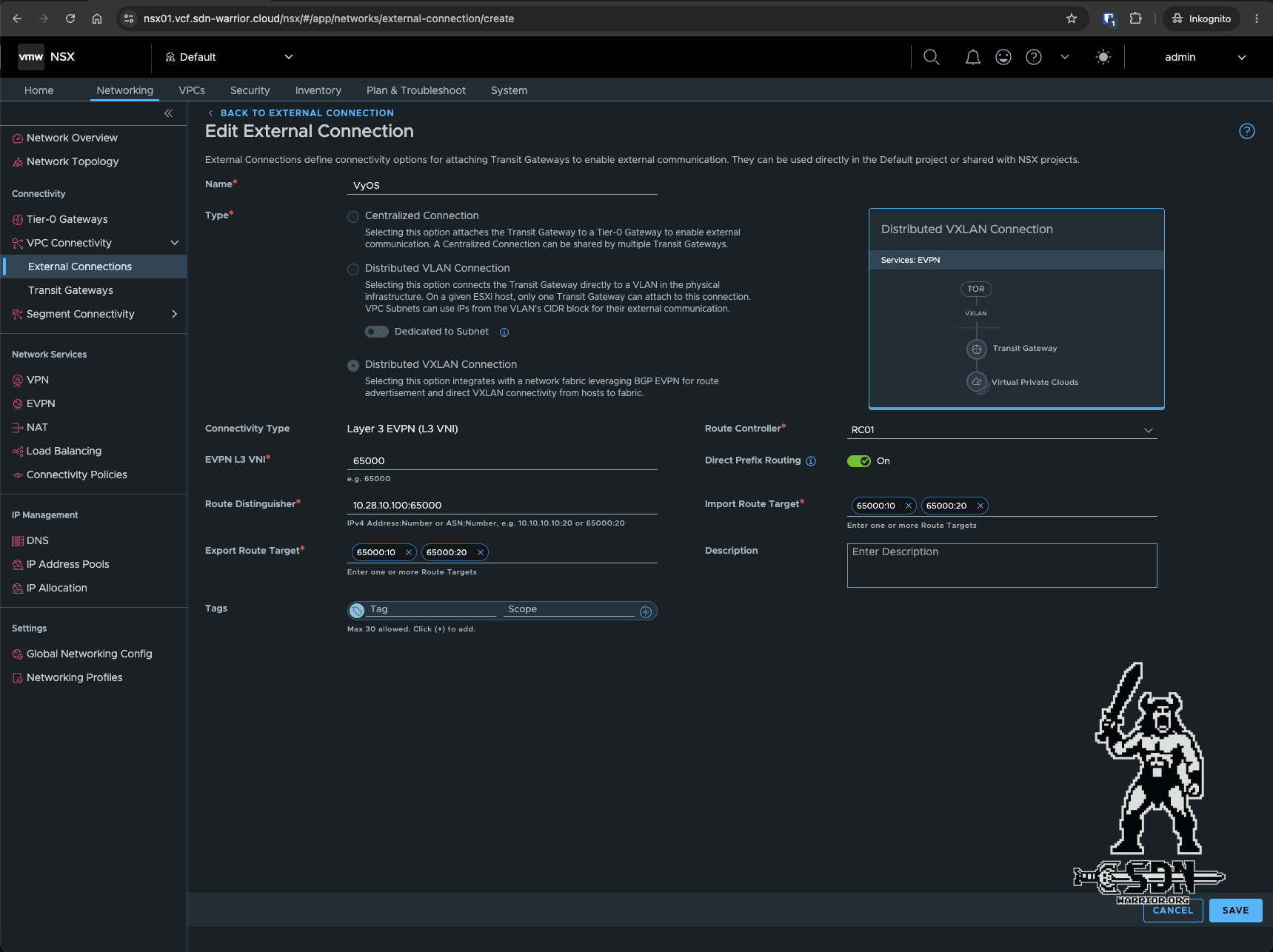
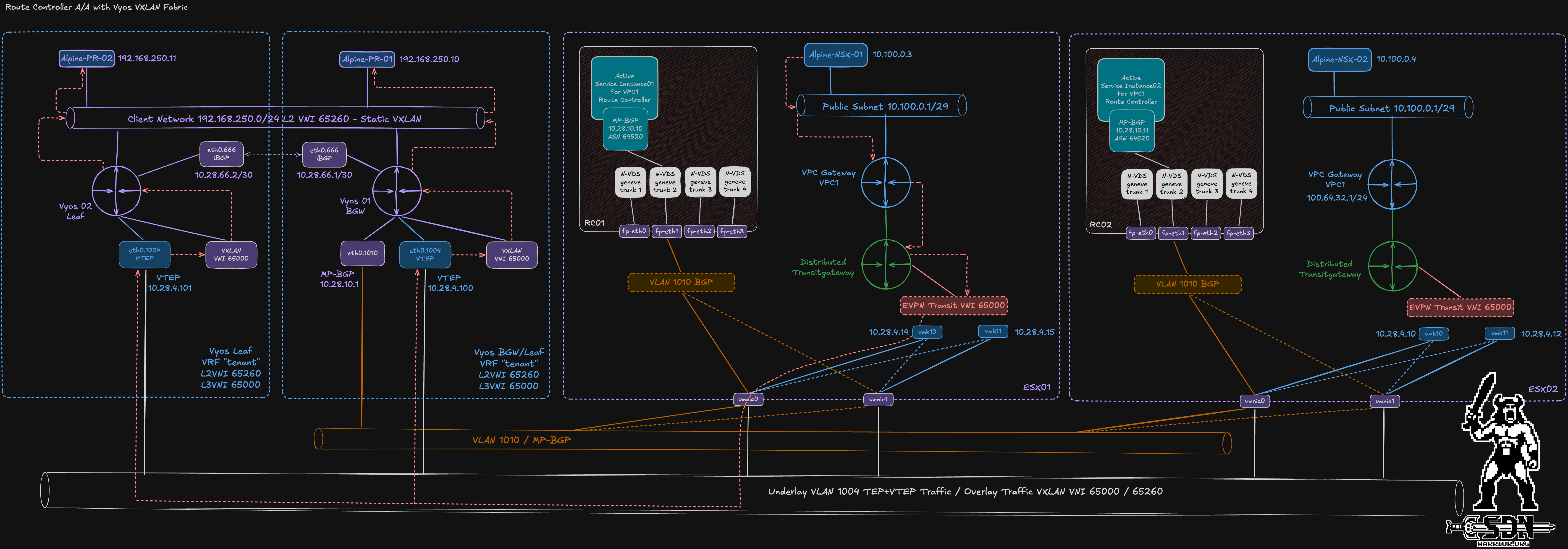
VXLAN EVPN Fabric with RC (click to open)
Design Decisions for Active/Active
Unlike in active/standby mode, no floating IP is used for the MP-BGP session. This means that the route controllers can be located in independent L3 segments and do not require a shared L2 infrastructure. As for the failure domain, Broadcom recommends using different ESX servers in different clusters and racks (if possible). At least two peerings to external BGW routers per route controller are recommended. ECMP with individual gateway VTEPs is possible. For BGP, the default values of 60/180 seconds are sufficient when BFD is used. While BFD is prohibited in active/standby mode, it is highly recommended in active/active mode.
Direct Prefix Routing
Strange name, big difference in the data path. The feature was just released in 9.1.1, and it changes quite a bit. In the 9.1 distributed VXLAN connectivity model, traffic between the virtual and physical fabrics was always routed through the BGW routers. With DPR, you can now change this. When this feature is enabled, the route controllers can receive and process specific host routes via the MP-BGP session. In 9.1, only a default route was accepted. If you look at the forwarding table of the Distributed Transit Gateway on the ESX server, you’ll see the difference right away. To make it easier to understand the forwarding table – and so you don’t have to search through the diagram for all the information – I’ve compiled all the relevant IP addresses in the following tables.
| ESXi Hostname | TEP 1 IP Address | TEP 2 IP Address |
|---|---|---|
| esx01.vcf.sdn-warrior.cloud | 10.28.4.14 | 10.28.4.15 |
| esx02.vcf.sdn-warrior.cloud | 10.28.4.10 | 10.28.4.12 |
| esx03.vcf.sdn-warrior.cloud | 10.28.4.11 | 10.28.4.13 |
| VyOS Hostname | Role | VTEP IP Address |
|---|---|---|
| VYOS-01-BGW | Border Gateway / Leaf | 10.28.4.100 |
| VYOS-02-Leaf | Leaf | 10.28.4.101 |
| Test VM | IP Address | Connected To |
|---|---|---|
| Alpine-PR-01 | 192.168.250.10/24 | VYOS-01-BGW |
| Alpine-PR-02 | 192.168.250.11/24 | VYOS-02-Leaf |
| Alpine-NSX-01 | 10.100.0.3/29 | NSX VPC |
| Alpine-NSX-02 | 10.100.0.4/29 | NSX VPC |
DTGW forwarding Table without DPR:
esx02.vcf.sdn-warrior.cloud> get gateway  5c47d546-9769-4cad-9d93-942a1349579d  forwarding
Sun Oct 11 2026 UTC 12:38:08.233
                                       Logical Routers Forwarding Table
--------------------------------------------------------------------------------------------------------------
Flags Legend: [U: Up], [G: Gateway], [C: Connected], [I: Interface]
[H: Host], [R: Reject], [B: Blackhole], [F: Soft Flush], [E: ECMP]
[S1|S2|S3: TGW Private|Public|External Route Scope]

                   Network                               Gateway                Type               Interface UUID
==============================================================================================================
0.0.0.0/0                                              10.28.4.100              UGS3    0016a939-70d3-454b-82f9-80d697d59940
10.100.0.0/29                                           100.64.0.1              UGS2    ebcf7572-759b-58b0-aa6c-c67d0741855a
10.100.0.8/32                                           100.64.0.1             UGHS2    ebcf7572-759b-58b0-aa6c-c67d0741855a
100.64.0.0/31                                            0.0.0.0                UCI     ebcf7572-759b-58b0-aa6c-c67d0741855a
fc37:a81f:5e4f:4000::/64                                    ::                  UCI     ebcf7572-759b-58b0-aa6c-c67d0741855a
fe80:11c:100:0:50:56ff:fe56:4452/128                        ::                  UCIH    ebcf7572-759b-58b0-aa6c-c67d0741855a
ff02:11c:100::1:ff00:1/128                                  ::                  UCIH    ebcf7572-759b-58b0-aa6c-c67d0741855a
ff02:11c:100::1:ff56:4452/128                               ::                  UCIH    ebcf7572-759b-58b0-aa6c-c67d0741855a

esx02.vcf.sdn-warrior.cloud>
The important thing here is the S3 route; without DPR, only the default route exists, with the next hop set to 10.28.4.100, which is the VTEP address of my BGW router. If I enable DPR now, the forwarding table will change.
esx02.vcf.sdn-warrior.cloud> get gateway  5c47d546-9769-4cad-9d93-942a1349579d  forwarding
Sun Oct 11 2026 UTC 12:46:58.152
                                       Logical Routers Forwarding Table
--------------------------------------------------------------------------------------------------------------
Flags Legend: [U: Up], [G: Gateway], [C: Connected], [I: Interface]
[H: Host], [R: Reject], [B: Blackhole], [F: Soft Flush], [E: ECMP]
[S1|S2|S3: TGW Private|Public|External Route Scope]

                   Network                               Gateway                Type               Interface UUID
==============================================================================================================
0.0.0.0/0                                              10.28.4.100              UGS3    0016a939-70d3-454b-82f9-80d697d59940
10.100.0.0/29                                           100.64.0.1              UGS2    ebcf7572-759b-58b0-aa6c-c67d0741855a
10.100.0.8/32                                           100.64.0.1             UGHS2    ebcf7572-759b-58b0-aa6c-c67d0741855a
100.64.0.0/31                                            0.0.0.0                UCI     ebcf7572-759b-58b0-aa6c-c67d0741855a
192.168.250.0/24                                       10.28.4.100              UGS3    0016a939-70d3-454b-82f9-80d697d59940
192.168.250.1/32                                       10.28.4.100             UGHS3    0016a939-70d3-454b-82f9-80d697d59940
192.168.250.10/32                                      10.28.4.100             UGHS3    0016a939-70d3-454b-82f9-80d697d59940
192.168.250.11/32                                      10.28.4.101             UGHS3    0016a939-70d3-454b-82f9-80d697d59940
fc37:a81f:5e4f:4000::/64                                    ::                  UCI     ebcf7572-759b-58b0-aa6c-c67d0741855a
fe80:11c:100:0:50:56ff:fe56:4452/128                        ::                  UCIH    ebcf7572-759b-58b0-aa6c-c67d0741855a
ff02:11c:100::1:ff00:1/128                                  ::                  UCIH    ebcf7572-759b-58b0-aa6c-c67d0741855a
ff02:11c:100::1:ff56:4452/128                               ::                  UCIH    ebcf7572-759b-58b0-aa6c-c67d0741855a

esx02.vcf.sdn-warrior.cloud>
There are now 4 new routes. All 4 are S3 routes, but 3 of them are host routes (UGHS3), and those are the exciting ones. We’ll ignore the route 192.168.250.1/32 - it’s due to my test setup. It’s the local bridge IP address I need for the L2 VNI setup, and it shouldn’t appear in a real fabric. The route 192.168.250.11/32 is more interesting. This route corresponds to my test VM, which is connected to my VyOS-02 leaf router. The default gateway for this route is the VTEP IP of the VyOS-02 leaf router, so I have a direct path to my VM without having to go through the BGW router. I also have a direct path for 192.168.250.10/32, but this test VM terminates at the BGW router, so its VTEP is listed as the next hop in the forwarding table.
Of course, now I also need to take a look at the routing table on my VyOS-02 leaf.
vyos@VYOS-02-LEAF:~$ show ip route vrf tenant bgp
Codes: K - kernel route, C - connected, L - local, S - static,
       R - RIP, O - OSPF, I - IS-IS, B - BGP, E - EIGRP, N - NHRP,
       T - Table, v - VNC, V - VNC-Direct, A - Babel, F - PBR,
       f - OpenFabric, t - Table-Direct,
       > - selected route, * - FIB route, q - queued, r - rejected, b - backup
       t - trapped, o - offload failure

IPv4 unicast VRF tenant:
B>* 0.0.0.0/0 [200/0] via 10.28.4.100, br65000 onlink, weight 1, 1d03h25m
B>* 10.100.0.3/32 [200/0] via 10.28.4.14, br65000 onlink, weight 1, 1d03h20m
B>* 10.100.0.4/32 [200/0] via 10.28.4.12, br65000 onlink, weight 1, 1d03h20m
B   192.168.250.0/24 [200/0] via 10.28.4.100, br65000 onlink, weight 1, 1d03h25m
B>* 192.168.250.1/32 [200/0] via 10.28.4.100, br65000 onlink, weight 1, 1d03h25m
B>* 192.168.250.10/32 [200/0] via 10.28.4.100, br65000 onlink, weight 1, 00:14:32
vyos@VYOS-02-LEAF:~$
If I now compare the next-hop IPs, you can see that I have direct paths to the TEP interfaces of the ESX servers for each of my test VMs in my VPC. When I communicate from my test VM Alpine-PR-02 (192.168.250.11) to the test VM Alpine-NSX-01 (10.100.0.3), the BGW is not included in the data path.
For comparison, let’s now take a look at the routing table on the BGW router.
vyos@VYOS-01-BGW:~$ show ip route vrf tenant bgp
Codes: K - kernel route, C - connected, L - local, S - static,
       R - RIP, O - OSPF, I - IS-IS, B - BGP, E - EIGRP, N - NHRP,
       T - Table, v - VNC, V - VNC-Direct, A - Babel, F - PBR,
       f - OpenFabric, t - Table-Direct,
       > - selected route, * - FIB route, q - queued, r - rejected, b - backup
       t - trapped, o - offload failure

IPv4 unicast VRF tenant:
B>* 10.100.0.3/32 [20/0] via 10.28.4.14, br65000 onlink, weight 1, 1d03h42m
                         via 10.28.4.14, br65000 onlink (dup), weight 1, 1d03h42m
B>* 10.100.0.4/32 [20/0] via 10.28.4.12, br65000 onlink, weight 1, 00:03:07
                         via 10.28.4.12, br65000 onlink (dup), weight 1, 00:03:07
B>* 10.100.0.8/32 [20/0] via 10.28.4.13, br65000 onlink, weight 1, 00:02:46
                         via 10.28.4.13, br65000 onlink (dup), weight 1, 00:02:46
B>* 10.100.0.9/32 [20/0] via 10.28.4.15, br65000 onlink, weight 1, 1d03h42m
                         via 10.28.4.15, br65000 onlink (dup), weight 1, 1d03h42m
B>* 192.168.250.11/32 [200/0] via 10.28.4.101, br65000 onlink, weight 1, 02:36:47
vyos@VYOS-01-BGW:~$
Here I see the same routes as on the Leaf Router, but these are learned by the Route Controller via the MP-BGP session rather than via iBGP. Since I’ve peered both Route Controllers to the same BGW, all routes are duplicated, which gives me control-plane redundancy – at least for the Route Controller.
Design Decisions Direct Prefix Routing
Of course, you shouldn’t use this feature across the board for everything. In a large fabric, routing tables can quickly become very large. Broadcom recommends using DPR for latency-sensitive traffic such as S3 or NFS. Additionally, you should define additional route targets for targeted import and export and configure them only on the relevant leaf switches. The additional route targets (RTs) must also be configured in the External Connection for the DTGW. You can see this in my screenshot of the External Connection. I created a separate RT (65000:20) specifically for DPR. Another recommendation is to set up prefix filters. Thanks to DPR, the RC also supports received Type 2 routes and translates them into host prefix forwarding entries for the DTGW on the ESX. Another important point is that each ESX server must be able to communicate with all relevant VTEP IP addresses on the leaf switches via its TEP network. Traffic that cannot be routed via DPR will continue to be routed through the BGW routers.
RT, Type 2, Type 5 ?!
Yes, unfortunately, this topic isn’t quite that simple, and to be honest, I’m having a bit of a hard time explaining it all in English, but I’ll give it a try anyway. I’ve already provided a general overview of the differences between Type 2 and Type 5 here. To give a practical example, let’s take a look at how the DTGW obtains its information so that I can access my Alpine PR-02 from any VM in my VPC.
- The Alpine-PR-02 VM is connected to the VyOS-02 leaf via eth1. The leaf learns the MAC/IP mapping and creates a Type 2 route based on it.
vyos@VYOS-02-LEAF:~$ show bgp l2vpn evpn route type 2
BGP table version is 123, local router ID is 10.28.4.101
Status codes: s suppressed, d damped, h history, * valid, > best, i - internal
Origin codes: i - IGP, e - EGP, ? - incomplete
EVPN type-1 prefix: [1]:[EthTag]:[ESI]:[IPlen]:[VTEP-IP]:[Frag-id]
EVPN type-2 prefix: [2]:[EthTag]:[MAClen]:[MAC]:[IPlen]:[IP]
EVPN type-3 prefix: [3]:[EthTag]:[IPlen]:[OrigIP]
EVPN type-4 prefix: [4]:[ESI]:[IPlen]:[OrigIP]
EVPN type-5 prefix: [5]:[EthTag]:[IPlen]:[IP]

   Network          Next Hop            Metric LocPrf Weight Path
                    Extended Community
Route Distinguisher: 10.28.4.101:2
 *>  [2]:[0]:[48]:[bc:24:11:53:89:c5]:[32]:[192.168.250.11]
                    10.28.4.101                        32768 i
                    ET:8 RT:64515:65260 RT:65000:20 Rmac:00:53:00:65:00:02
Here we find all the important information: the next hop (10.28.4.101), the IP address (192.168.250.11), the MAC address (bc:24:11:53:89:c5), and the RT (RT:65000:20).
vyos@VYOS-02-LEAF:~$ show bgp l2vpn evpn neighbors 10.28.66.1 advertised-routes
BGP table version is 0, local router ID is 10.28.4.101
Default local pref 100, local AS 64515
Status codes: s suppressed, d damped, h history, * valid, > best, i - internal
Origin codes: i - IGP, e - EGP, ? - incomplete

   Network          Next Hop            Metric LocPrf Weight Path
Route Distinguisher: 10.28.4.101:2
 *> [2]:[0]:[48]:[bc:24:11:53:89:c5]:[32]:[192.168.250.11]
                                  100  32768 i
The BGW receives the Type 2 route via iBGP. Since RT 65000:20 is configured as an import RT for its tenant VRF, the route can also be imported into the corresponding routing context.
vyos@VYOS-01-BGW:~$ show bgp l2vpn evpn route type 2
BGP table version is 123, local router ID is 10.28.10.1
Status codes: s suppressed, d damped, h history, * valid, > best, i - internal
Origin codes: i - IGP, e - EGP, ? - incomplete
EVPN type-1 prefix: [1]:[EthTag]:[ESI]:[IPlen]:[VTEP-IP]:[Frag-id]
EVPN type-2 prefix: [2]:[EthTag]:[MAClen]:[MAC]:[IPlen]:[IP]
EVPN type-3 prefix: [3]:[EthTag]:[IPlen]:[OrigIP]
EVPN type-4 prefix: [4]:[ESI]:[IPlen]:[OrigIP]
EVPN type-5 prefix: [5]:[EthTag]:[IPlen]:[IP]

   Network          Next Hop            Metric LocPrf Weight Path
                    Extended Community
Route Distinguisher: 10.28.4.101:2
 *>i [2]:[0]:[48]:[bc:24:11:53:89:c5]
                    10.28.4.101                   100      0 i
                    RT:64515:65260 ET:8
 *>i [2]:[0]:[48]:[bc:24:11:53:89:c5]:[32]:[192.168.250.11]
                    10.28.4.101                   100      0 i
                    RT:64515:65260 RT:65000:20 ET:8 Rmac:00:53:00:65:00:02
Here, too, we can see all the relevant information. The BGW is now advertising this route as a Type 2 route to both route controllers.
vyos@VYOS-01-BGW:~$ show bgp l2vpn evpn neighbors 10.28.10.100 advertised-routes
BGP table version is 0, local router ID is 10.28.10.1
Default local pref 100, local AS 64515
Status codes: s suppressed, d damped, h history, * valid, > best, i - internal
Origin codes: i - IGP, e - EGP, ? - incomplete

   Network          Next Hop            Metric LocPrf Weight Path
Route Distinguisher: 10.28.4.100:10
 *> [5]:[0]:[0]:[0.0.0.0]
                                       32768 i
 *> [5]:[0]:[24]:[192.168.250.0]
                             0         32768 ?
Route Distinguisher: 10.28.4.101:2
 *> [2]:[0]:[48]:[bc:24:11:53:89:c5]
                                  100      0 i
 *> [2]:[0]:[48]:[bc:24:11:53:89:c5]:[32]:[192.168.250.11]
                                  100      0 i

vyos@VYOS-01-BGW:~$ show bgp l2vpn evpn neighbors 10.28.10.101 advertised-routes
BGP table version is 0, local router ID is 10.28.10.1
Default local pref 100, local AS 64515
Status codes: s suppressed, d damped, h history, * valid, > best, i - internal
Origin codes: i - IGP, e - EGP, ? - incomplete

   Network          Next Hop            Metric LocPrf Weight Path
Route Distinguisher: 10.28.4.100:10
 *> [5]:[0]:[0]:[0.0.0.0]
                                       32768 i
 *> [5]:[0]:[24]:[192.168.250.0]
                             0         32768 ?
Route Distinguisher: 10.28.4.101:2
 *> [2]:[0]:[48]:[bc:24:11:53:89:c5]
                                  100      0 i
 *> [2]:[0]:[48]:[bc:24:11:53:89:c5]:[32]:[192.168.250.11]
                                  100      0 i
Here you can clearly see that not only is the route to the VM advertised, but also the default route (as a Type 5 route), which is still absolutely necessary. As the final step, the Route Controller learns the route when RT 65000:20 has been configured as an import and distributes the forwarding information to the ESX hosts via the CCP. As a result, we see a /32 Host route in the forwarding table on our ESX servers.
esx02.vcf.sdn-warrior.cloud> get gateway  5c47d546-9769-4cad-9d93-942a1349579d  forwarding
Sun Oct 11 2026 UTC 15:04:16.768
                                       Logical Routers Forwarding Table
--------------------------------------------------------------------------------------------------------------
Flags Legend: [U: Up], [G: Gateway], [C: Connected], [I: Interface]
[H: Host], [R: Reject], [B: Blackhole], [F: Soft Flush], [E: ECMP]
[S1|S2|S3: TGW Private|Public|External Route Scope]

                   Network                               Gateway                Type               Interface UUID
==============================================================================================================
0.0.0.0/0                                              10.28.4.100              UGS3    0016a939-70d3-454b-82f9-80d697d59940
10.100.0.0/29                                           100.64.0.1              UGS2    ebcf7572-759b-58b0-aa6c-c67d0741855a
10.100.0.8/32                                           100.64.0.1             UGHS2    ebcf7572-759b-58b0-aa6c-c67d0741855a
100.64.0.0/31                                            0.0.0.0                UCI     ebcf7572-759b-58b0-aa6c-c67d0741855a
192.168.250.0/24                                       10.28.4.100              UGS3    0016a939-70d3-454b-82f9-80d697d59940
192.168.250.1/32                                       10.28.4.100             UGHS3    0016a939-70d3-454b-82f9-80d697d59940
192.168.250.10/32                                      10.28.4.100             UGHS3    0016a939-70d3-454b-82f9-80d697d59940
192.168.250.11/32                                      10.28.4.101             UGHS3    0016a939-70d3-454b-82f9-80d697d59940
fc37:a81f:5e4f:4000::/64                                    ::                  UCI     ebcf7572-759b-58b0-aa6c-c67d0741855a
fe80:11c:100:0:50:56ff:fe56:4452/128                        ::                  UCIH    ebcf7572-759b-58b0-aa6c-c67d0741855a
ff02:11c:100::1:ff00:1/128                                  ::                  UCIH    ebcf7572-759b-58b0-aa6c-c67d0741855a
ff02:11c:100::1:ff56:4452/128                               ::                  UCIH    ebcf7572-759b-58b0-aa6c-c67d0741855a
Basically, that’s the whole magic behind DPR. Since the routes are distributed via the BGW router, the traffic can still be forwarded directly to the leaf.
Now that we have the basics covered, we can expand the entire setup to include stateful services. Yes, you heard that right. VCF 9.1.1 now also supports stateful services using the Distributed VXLAN Connectivity Model.
VNA and Route Controller - its a perfect match
I’ve been waiting for this feature, and I had hoped it would be included in 9.1 when I checked out the RC. For anyone who doesn’t know what the VNA is, what it can do, or how it’s set up, I recommend reading this article and this one first.
VNA Support enables the following:
- Default Outbound NAT (Auto-SNAT)
- custom NAT
- DHCP relay for external DHCP servers
- load balancing
This also means that you can use VKS and Automation in “All Apps” mode, but setting that up is a topic for a separate blog post. Here, I’ll just show you how to make the VNA work in the distributed VXLAN model.
Unfortunately, you can’t simply enable stateful services on the Route Controller cluster. To do so, you must deploy a dedicated VNA cluster consisting of at least one VNA appliance. In my setup, I have therefore deployed a VNA node.
To use the VNA, you must configure it in the VPC connectivity profile. I encountered an error here and received the following error message:
This feature requires TN Minimum Version >= 9.1.1.0
My deployment was a greenfield 9.1.1 setup that I had previously patched to 9.1.1.0100. And so my environment should actually have met all the requirements.
To resolve the issue, simply set the TN version to 9.1.1.0 via the API.
PUT https://<nsx-mgr>/policy/api/v1/infra/sites/default/enforcement-points/default/host-transport-nodes/feature-opt-in

{
   "host_tn_min_os_version": "9.1.1.0"
}
It took about 5 minutes before I was able to configure the VNA in the VPC Connectivity Profile. Once the VNA is configured in the profile, a service subnet is configured for the VPC gateway. As you can see from the diagram, the VNA connection is set up exactly the same way as if I were using a DTGW with VLAN-backed connectivity.
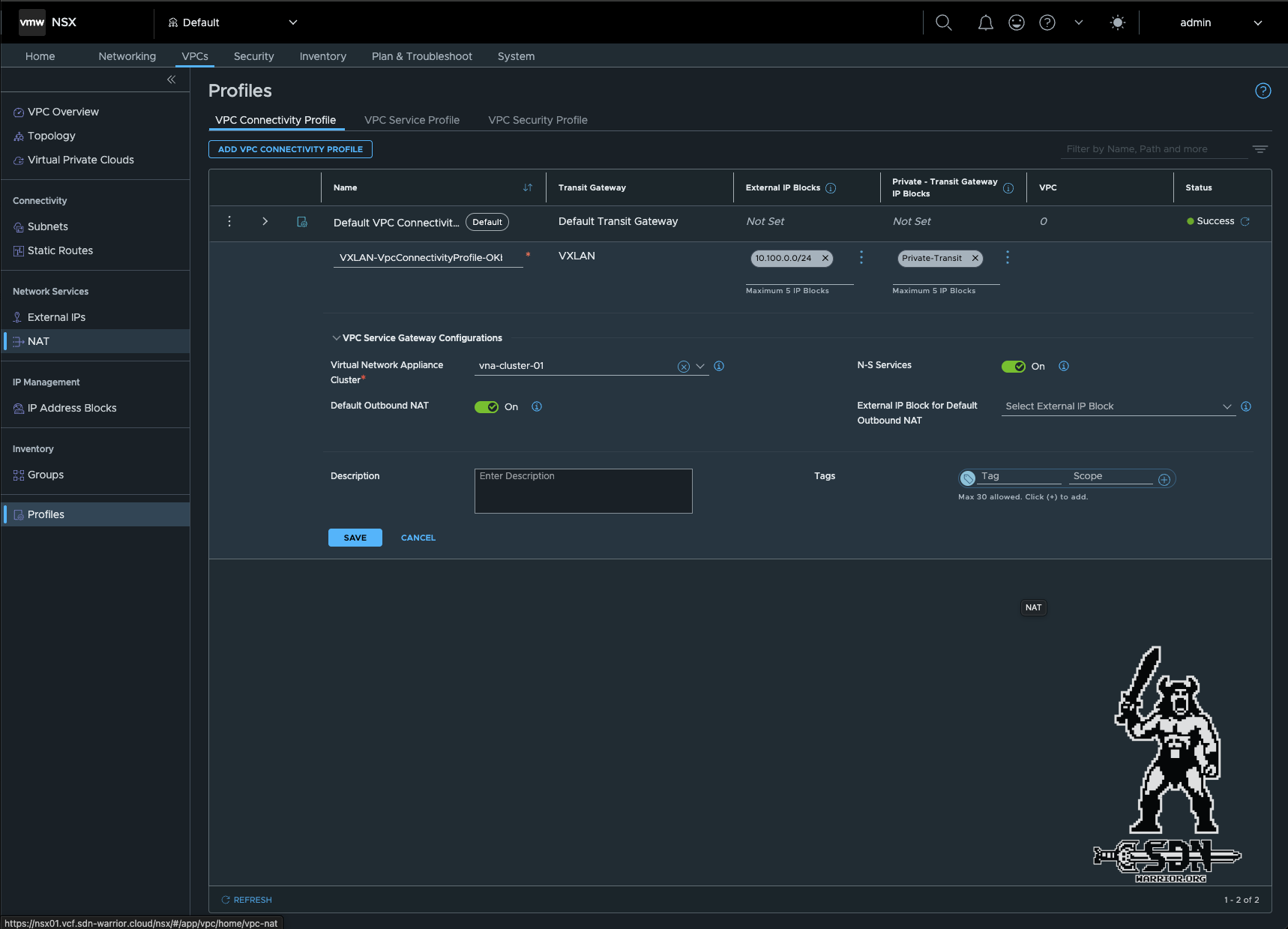
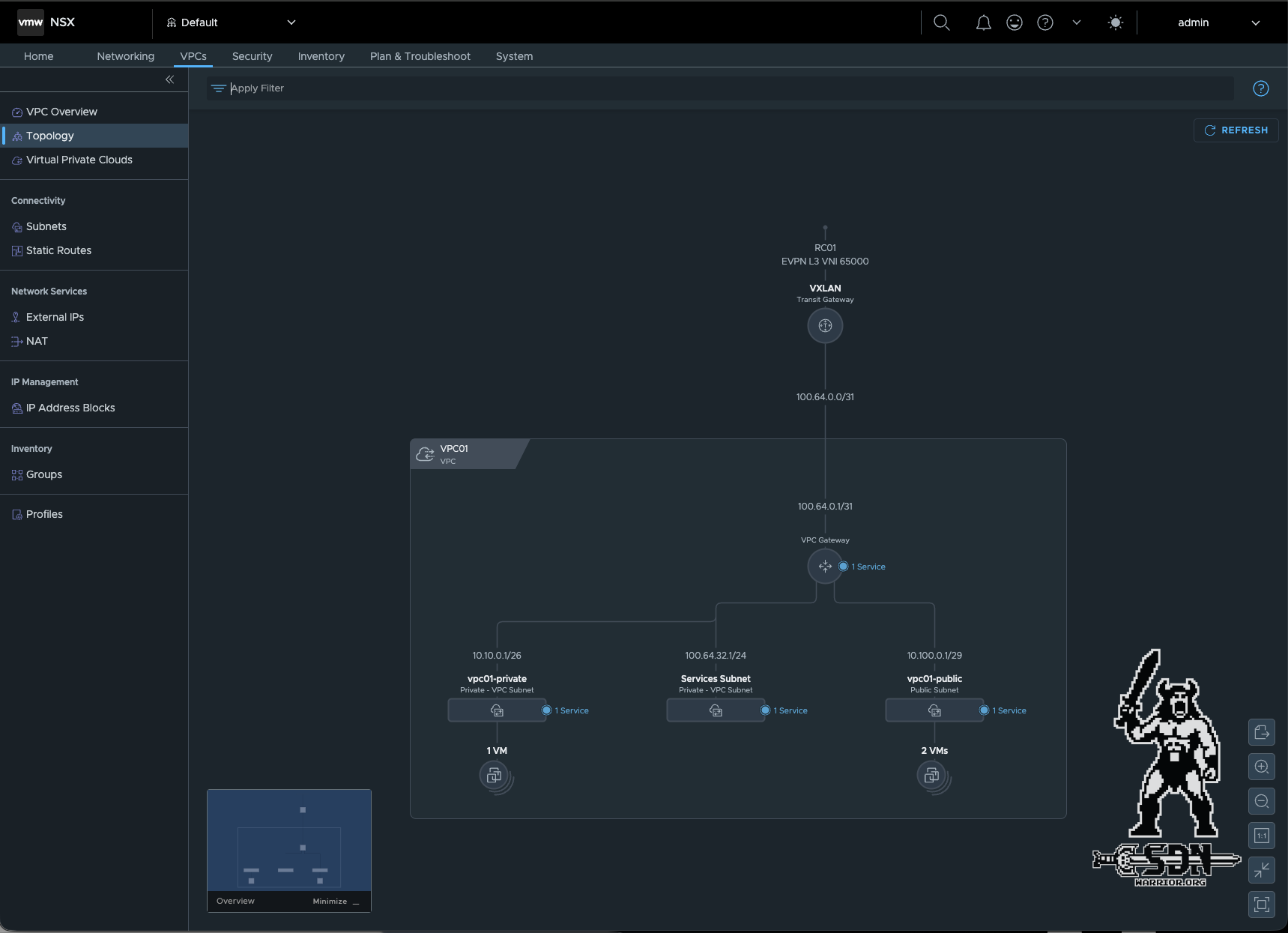
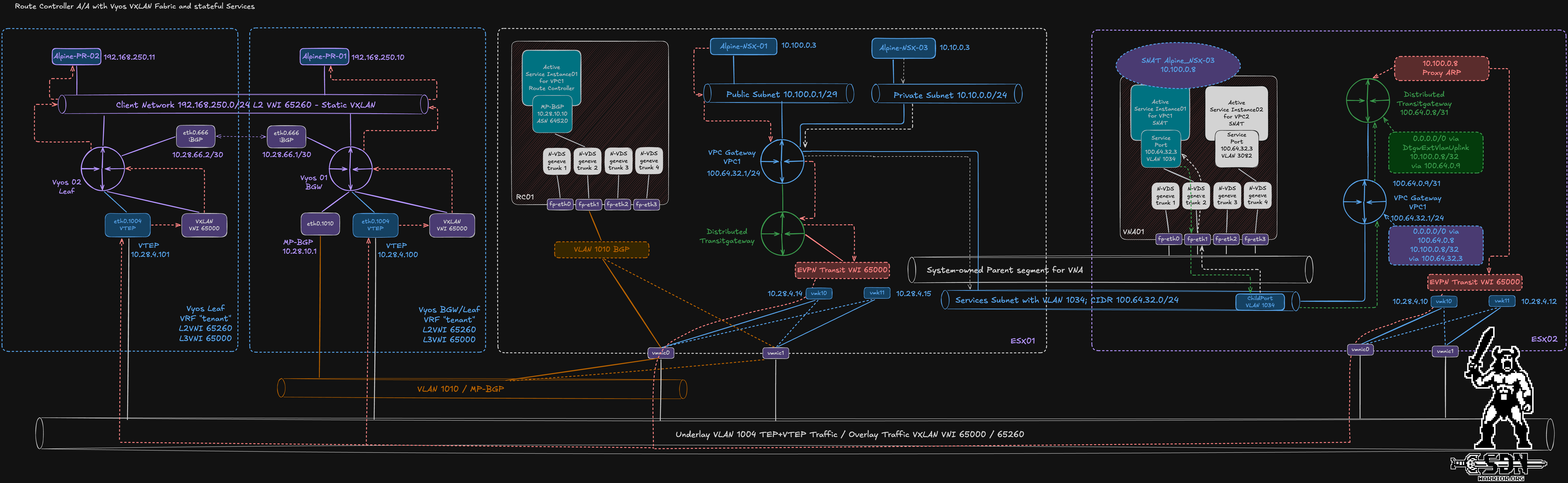
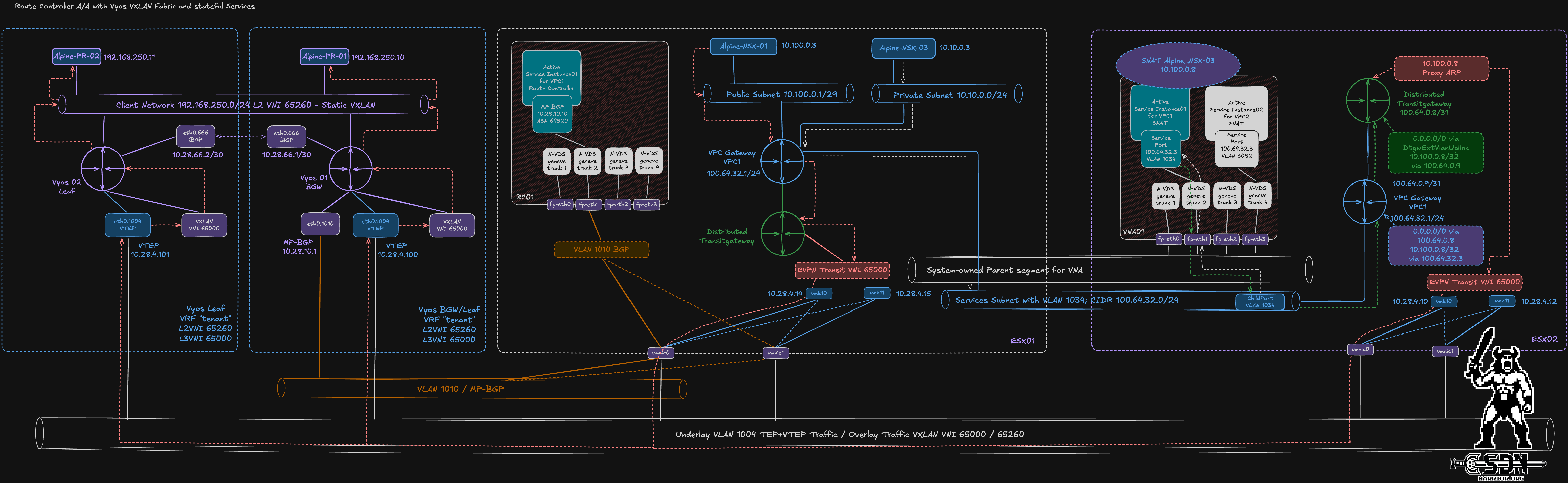
VXLAN EVPN Fabric with RC and VNA (click to open)
For my test, I created a private segment in my VPC and deployed a test VM (Alpine-NSX-03/10.10.0.3). My VNA appliance is on my ESX Host 3, and DPR is enabled. When I look at the traffic in Traceflow now, I can clearly see how the traffic flows from Alpine-NSX-03 to Alpine-PR-02.
| OT | Transport Node | Component | IP Address |
|---|---|---|---|
| Injected | esx01.vcf.sdn-warrior.cloud | alpine-nsx-03.vmx@cf682e4f-9ae8-494a-8f0f-91e6b1874135 | |
| Forwarded | esx01.vcf.sdn-warrior.cloud | vpc01-private | |
| Received | esx01.vcf.sdn-warrior.cloud | VPC01 | |
| Forwarded | esx01.vcf.sdn-warrior.cloud | VPC01 | |
| Received | esx01.vcf.sdn-warrior.cloud | Services Subnet | |
| Forwarded | esx01.vcf.sdn-warrior.cloud | Physical | Local:10.28.4.15 Remote:10.28.4.13 |
| Received | esx03.vcf.sdn-warrior.cloud | Physical | |
| Forwarded | esx03.vcf.sdn-warrior.cloud | Physical | |
| Received | vna01 | Physical | |
| Forwarded | vna01 | Edge Host Switch | |
| Received | vna01 | VPC01 | |
| Forwarded | vna01 | VPC01 | |
| Received | vna01 | NAT | |
| Forwarded | vna01 | NAT | |
| Forwarded | vna01 | VPC01 | |
| Received | vna01 | Edge Host Switch | |
| Forwarded | vna01 | Physical | |
| Received | esx03.vcf.sdn-warrior.cloud | Physical | |
| Forwarded | esx03.vcf.sdn-warrior.cloud | Services Subnet | |
| Received | esx03.vcf.sdn-warrior.cloud | VPC01 | |
| Forwarded | esx03.vcf.sdn-warrior.cloud | VPC01 | |
| Forwarded | esx03.vcf.sdn-warrior.cloud | transit-lr-71e28b38-6043-4654-ad38-1367f351ae0d | |
| Received | esx03.vcf.sdn-warrior.cloud | VXLAN | |
| Forwarded | esx03.vcf.sdn-warrior.cloud | VXLAN | |
| Received | esx03.vcf.sdn-warrior.cloud | dtgw-evpn-transit-ls-65000 | |
| Forwarded | esx03.vcf.sdn-warrior.cloud | Physical | Local:10.28.4.13 Remote:10.28.4.101 |
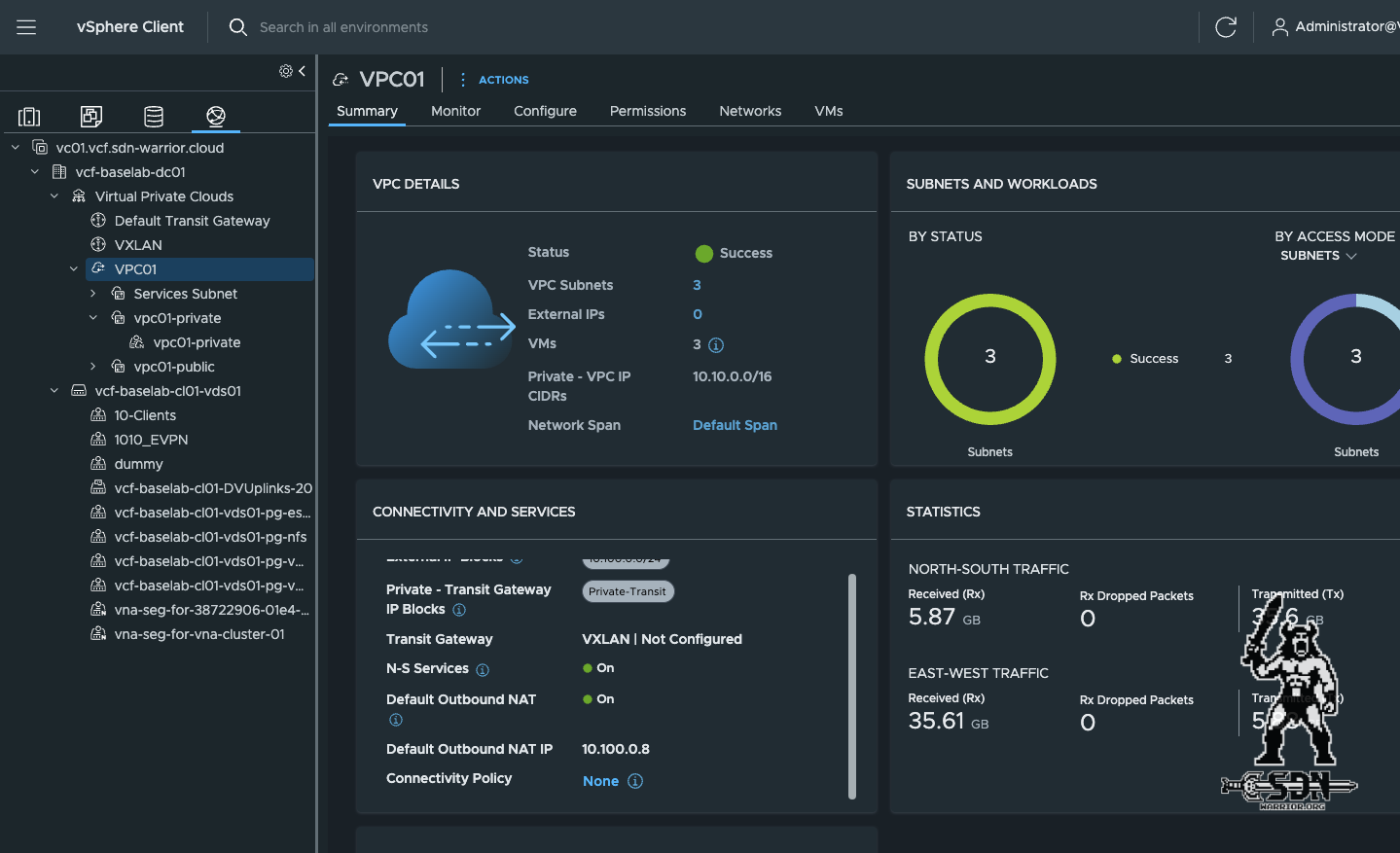
What becomes clear here is that the traffic is routed through the VNA appliance due to the default outbound NAT, and that the traffic is passed on to the physical network via the TEP interface of ESX03. Furthermore, the destination is not the BGW router, but the leaf to which the destination VM is connected. You can view the default outbound NAT IP (10.100.0.8) in the VPC overview in vCenter or in NSX. There is a dedicated /32 route for the VNA on the VyOS fabric.
vyos@VYOS-01-BGW:~$ show ip route vrf tenant
Codes: K - kernel route, C - connected, L - local, S - static,
       R - RIP, O - OSPF, I - IS-IS, B - BGP, E - EIGRP, N - NHRP,
       T - Table, v - VNC, V - VNC-Direct, A - Babel, F - PBR,
       f - OpenFabric, t - Table-Direct,
       > - selected route, * - FIB route, q - queued, r - rejected, b - backup
       t - trapped, o - offload failure

IPv4 unicast VRF tenant:
B>* 10.100.0.3/32 [20/0] via 10.28.4.14, br65000 onlink, weight 1, 1d06h53m
                         via 10.28.4.14, br65000 onlink (dup), weight 1, 1d06h53m
B>* 10.100.0.4/32 [20/0] via 10.28.4.12, br65000 onlink, weight 1, 03:13:50
                         via 10.28.4.12, br65000 onlink (dup), weight 1, 03:13:50
B>* 10.100.0.8/32 [20/0] via 10.28.4.13, br65000 onlink, weight 1, 00:23:02
                         via 10.28.4.13, br65000 onlink (dup), weight 1, 00:23:02
C>* 192.168.250.0/24 is directly connected, br65260, weight 1, 1d03h29m
L>* 192.168.250.1/32 is directly connected, br65260, weight 1, 1d03h29m
B>* 192.168.250.11/32 [200/0] via 10.28.4.101, br65000 onlink, weight 1, 05:47:30
vyos@VYOS-01-BGW:~$
What looks so complicated in the drawing isn’t really that complicated, is it?
Special Case: External IP
A quick note on external IPs: As you probably know, you can easily assign an external IP in vCenter by right-clicking a VM in a private segment. As soon as you do this, a reflexive 1-to-1 NAT is created on the ESX server, which automatically disables the default outbound NAT for the VM. As a result, a /32 route appears in VyOS for the external IP, pointing to the TEP IP of the ESX server on which the VM is running. Additionally, no traffic from this VM will pass through the VNA. This sounds good at first, but it comes with a drawback: reflexive NAT is stateless, meaning it exposes my VM and makes it more vulnerable since there is no session awareness, return traffic validation, and so on. Therefore, the recommendation is to use a combination of DNAT and SNAT instead if a VM in the private segment needs to be exposed, as this gives me more control. Of course, it always depends on the use case.
Conclusion
With VCF 9.1.1, connecting VPCs becomes even more flexible, but this comes at the cost of a certain degree of complexity. In my view, the VNA extension is what makes Distributed VXLAN Connectivity truly interesting, as it allows you to harness the full potential of VPCs and, thanks to DPR, gives you significant control over the actual data path. The active/active setup is also a much-needed enhancement and makes my architecture more flexible and robust. VCF 9.1.1 offers even more new features, but that’s a topic for another article.